Which Parallel Deadlocks Produce Deadlock Graphs In SQL Server?

Sadness


There are two types of parallel deadlocks. The kind that end in an error message, and the kind that are resolved by exchanges spilling buffers.

It used to be that both kinds would produce deadlock graphs. Microsoft even added some additional troubleshooting information specifically for them.

But apparently that had some overhead, and parallel deadlocks for exchange spills got pulled from the equation.

I checked back to SQL Server 2012 and 2014 on their respective latest service packs, and they both still capture deadlock graphs for exchange spills.

There have been some CUs since Sp3 for SQL Server 2014, but they don’t mention anything about this being backported in them.

Why Is This A Big Deal?


If you were digging into query performance issues, or if you were capturing deadlocks somehow, you used to be able to find queries with these problems pretty easily.

In the article that describes a fix for many deadlock reports, Microsoft offers up an alternative Extended Event session to capture queries that produce error 1205 (a deadlock), but I wasn’t able to get that to capture deadlocks that were resolved by exchange spills.

I don’t think they actually produce that error, which is also why they don’t produce a deadlock graph.

Why they did that when there is, quite not-figuratively, an event dedicated to capturing exchange spills, is beyond me.
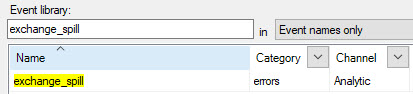
2020 10 19 10 56 20
i mean really

For me personally, it was a bit of a curveball for sp_BlitzLock. The XML that got produced for exchange spill deadlocks has different characteristics from the ones that produce errors.

There’s a lot of stuff that isn’t documented, too.

Change It Back?


I’m assuming there was some technical challenge to producing a single deadlock graph for exchange spills, which is why it got pulled instead of fixed.

Normally I’d think about opening a UserVoice item, but it doesn’t seem like it’d go anywhere.

There’s enough good ideas on there now that haven’t seen any traction or attention.

Anyway, if you’re on a newer version of SQL Server, take note of the change if you’re troubleshooting this sort of thing.

Thanks for reading!

Going Further


If this is the kind of SQL Server stuff you love learning about, you’ll love my training. Blog readers get 25% off the Everything Bundle — over 100 hours of performance tuning content. Need hands-on help? I offer consulting engagements from targeted investigations to ongoing retainers. Want a quick sanity check before committing to a full engagement? Schedule a call — no commitment required.
Options For Fixing Parallel Query Deadlocks In SQL Server

Recreating


If you have a copy of the StackOverflow2013 database, this query should produce a parallel deadlock.

SELECT c.Id, c.UserId, c.CreationDate, c.PostId, c.Score 
INTO #ohno 
FROM dbo.Comments AS c WITH (TABLOCKX);

If you want an easy way to track down deadlocks, I can’t recommend sp_BlitzLock enough.

It doesn’t render the deadlock graph for you, but it does get you the deadlock XML, which you can save as an XDL file.

For viewing them, Sentry One’s Plan Explorer tool is way better than SSMS. It doesn’t just explore plans — it also explores deadlocks.

Graphed Out


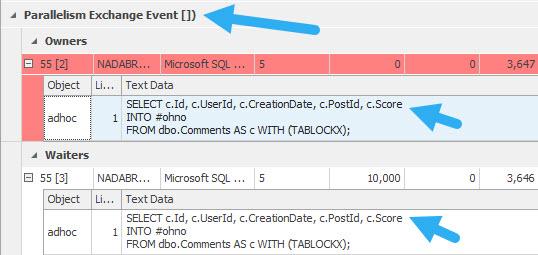
The way it’ll look is something like this:

SQL Server Deadlock
ow my face

You’ll see the exchange event, and you’ll also see the same query deadlocking itself.

This is an admittedly odd situation, but one I’ve had to troubleshoot a bunch of times.

You might see query error messages something like this:

Msg 1205, Level 13, State 18, Line 3
Transaction (Process ID 55) was deadlocked on lock | communication buffer resources with another process and has been chosen as the deadlock victim. Rerun the transaction.

Options For Fixing It


If you start running into these, it can be for a number of reasons, but the root cause is a parallel query. That doesn’t mean you should change MAXDOP to 1, though you should check your parallelism settings to make sure they’re not at the defaults.

You may want to try setting the query you’re having a problem with to DOP 1. Sure, performance might suffer, but at least it won’t error out.

If that’s not possible, you might need to look at other things in the query. For example, you might be missing a helpful index that would make the query fast without needing to go parallel.

Another issue you might spot in query plans is around order preserving operators. I wrote a whole bunch about that with an example here. You might see it around operators like Sorts, Merges, and Stream Aggregates when they’re surrounding parallel exchange operators. In those cases, you might need to hint HASH joins or aggregations.

Thanks for reading!

Going Further


If this is the kind of SQL Server stuff you love learning about, you’ll love my training. Blog readers get 25% off the Everything Bundle — over 100 hours of performance tuning content. Need hands-on help? I offer consulting engagements from targeted investigations to ongoing retainers. Want a quick sanity check before committing to a full engagement? Schedule a call — no commitment required.