T-SQL Tuesday: The Last Ticket I Closed

T SQL Tuesday LogoForeign Keys Suck


For this month’s T-SQL Tuesday, Brent Ozar (blog) wants to see your receipts.

I didn’t have a chance to write this post yesterday, because I was in the midst of closing the ticket.

Here’s a short synopsis from the client emergency:

  • Third party vendor
  • Merge statement compiled in a DLL file
  • Called frequently
  • Uses a Table-Valued Parameter
  • Merges into one small table…
  • Which has an indexed foreign key to a huge table
  • Constantly deadlocking with other calls to the same merge query

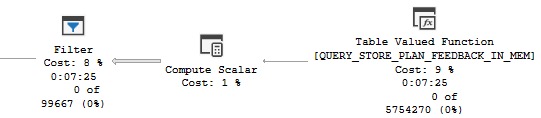
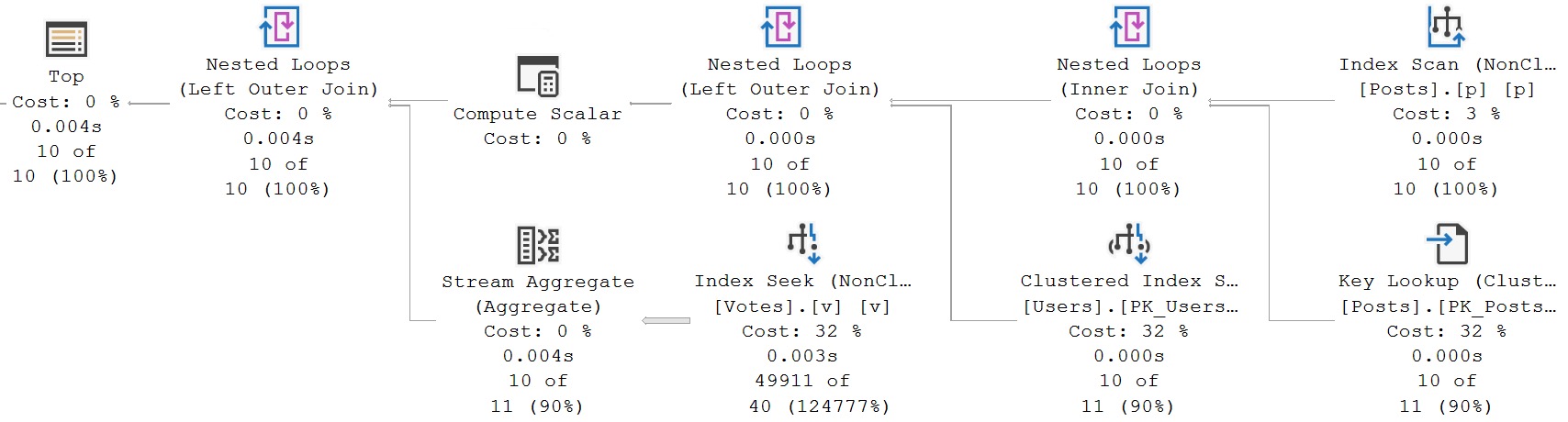
To evaluate the foreign key, SQL Server was choosing this execution plan:

sql server query plan
suck

I hate the optimizer, some days. I really do.

Whatever year it’s stuck in is an unfortunate one.


Eager Index Spools Suck


Why in the name of Babe the blue-balled Ox would SQL Server’s advanced, intelligent, hyper-awesome, $7k a core query optimizer choose to build an index spool here, on 7 million rows?

Here are some things we tried to get rid of it:

  • Add a clustered index to the target table
  • Add a single-column index on the already-indexed clustered index key
  • Add primary keys to the Table Types

If I had access to the merge statement, I would have torn it to shreds separate insert, update, and delete statements.

But would that have helped with SQL Server’s dumb execution plan choice in evaluating the foreign key? Would a FORCESEEK hint even be followed into this portion of the execution plan?

RCSI wouldn’t help here, because foreign key evaluation is done under Read Committed Locking isolation.

I don’t know. We can’t just recompile DLLs. All I know is that building the eager index spool is slowing this query down just enough to cause it to deadlock.

So, I took a page out of the Ugly Pragmatism handbook. I disabled the foreign key, and set up a job to look for rogue rows periodically.

Under non-Merge circumstances, I may have written a trigger to replace the foreign key. In that very moment, I had some doubts about writing a trigger quickly that would have worked correctly with:

  • All of Merge’s weirdness
  • Under concurrency

In reality, the foreign key wasn’t contributing much. The application only ever allows users to put rows in the parent table, and additional information only gets added to the child table by a system process after the original “document” is processed.

So, goodbye foreign key, goodbye eager index spool, goodbye deadlocks.

Thanks for reading!

Going Further


If this is the kind of SQL Server stuff you love learning about, you’ll love my training. Blog readers get 25% off the Everything Bundle — over 100 hours of performance tuning content. Need hands-on help? I offer consulting engagements from targeted investigations to ongoing retainers. Want a quick sanity check before committing to a full engagement? Schedule a call — no commitment required.
When SQL Server Isn’t Smart About Aggregates Part 1

With Sympathy


Of all the cardinality estimation processes that SQL Server has to do, the two that I sympathize the most with are joins and aggregations.

It would be nice if the presence of a foreign key did absolutely anything at all whatsoever to improve join estimation, but that’s just another example of a partial birth feature in SQL Server.

While SQL Server 2022 does have Cardinality Estimation Feedback available, you need to:

  • Use compatibility level 160
  • Enable the database scoped configuration
  • Have Query Store enabled to persist the hint

The compatibility level thing can be a real deal-breaker for a lot of people, though I think a safer path forward is to use the legacy cardinality estimator in conjunction with higher compatibility levels, like so:

ALTER DATABASE SCOPED CONFIGURATION 
SET LEGACY_CARDINALITY_ESTIMATION = ON;

ALTER DATABASE StackOverflow2013 
SET COMPATIBILITY_LEVEL = 160;

At any rate, Cardinality Estimation feedback, at least in its initial implementation, does not work do anything for aggregations.

Team Spirit


One thing I’m always grateful for is the circle of smart folks I can share my demos, problems, ideas, and material with for sanity checking.

While I was talking about the HT waits, this demo query came up, where SQL Server just makes the dumbest possible choice, via Paul White (b|t):

SELECT
    PScore = MAX(p.Score),
    CScore = MAX(c.Score)
FROM dbo.Posts AS p
JOIN dbo.Comments AS c
  ON c.UserId = p.OwnerUserId;
GO

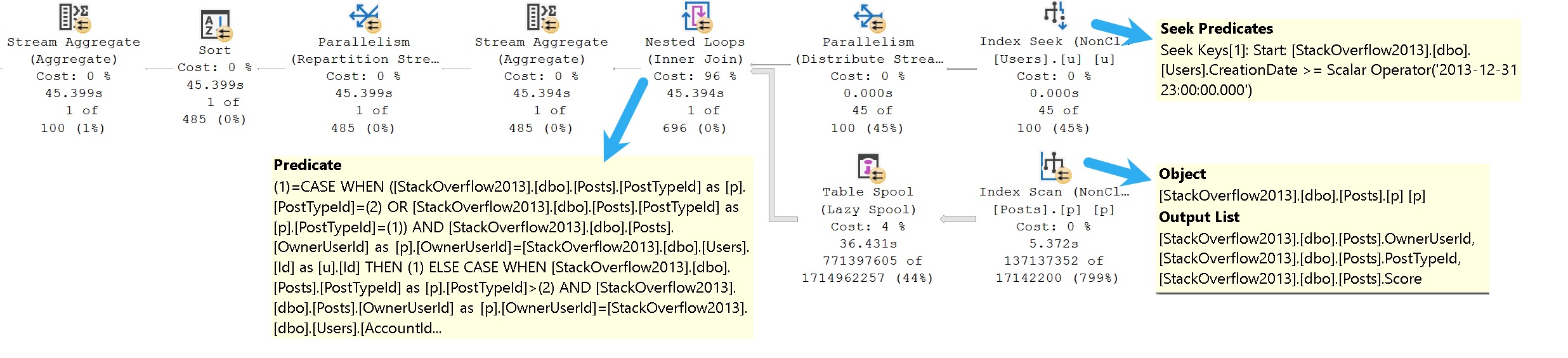
Here’s the query plan, which yes, you’re reading correctly, runs for ~23 seconds, fully joining both tables prior to doing the final aggregation.

sql server query plan
poor choice, that

I’m showing you a little extra here, because there are missing index requests that the optimizer asks for, but we’ll talk about those in tomorrow’s post.

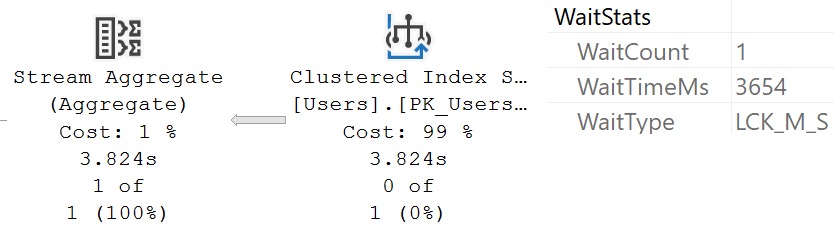
The wait stats for this query, since it’s running in Batch Mode, are predictably HT-related.

sql server wait stats
ouch dude

It’s not that the optimizer isn’t capable of doing early aggregations — in many cases it will do so quite eagerly — it just… Doesn’t here.

Rewrite #1: Manually Aggregate Posts


Part of what I get paid to do is spot this stuff, and figure out how to make queries better.

If I saw this one, I’d probably start by trying something like this:

WITH
    p AS 
(
    SELECT
        UserId = p.OwnerUserId,
        Score = MAX(p.Score)
    FROM dbo.Posts AS p
    GROUP BY
        p.OwnerUserId
)
SELECT
    PScore = MAX(p.Score),
    CScore = MAX(c.Score)
FROM p
JOIN dbo.Comments AS c
  ON c.UserId = p.UserId;
GO

Which would be a pretty good improvement straight out of the gate.

sql server query plan
worth the money

From 23 seconds to 1.2 seconds right off the bat. Pretty good. Note the join placement though, with Posts on the outer, and Comments on the inner side of the join.

Rewrite #2: Manually Aggregate Comments


What if we thought this was maybe a bad situation, and we wanted to try get a different query plan? What if we really didn’t enjoy the 986% overestimate?

WITH
    c AS
(
    SELECT
        UserId = c.UserId,
        Score = MAX(c.Score)
    FROM dbo.Comments AS c
    GROUP BY
        c.UserId
)
SELECT
    PScore = MAX(p.Score),
    CScore = MAX(c.Score)
FROM dbo.Posts AS p
JOIN c
  ON c.UserId = p.OwnerUserId;
GO

We could write the query like above, and see if SQL Server does any better. Right? Right.

sql server query plan
christmas bonus

Now we’re down under a second. Comments is on the outer, and Posts is on the inner side of the join, and estimates across the board are just about spot-on.

I know what you’re thinking: We should aggregate BOTH first. When we leave it up to SQL Server’s optimizer, it’s still not getting the early aggregation message.

Rewrite #3: Manually Aggregate Both


You might be thinking “I bet if we aggregate both, it’ll take 500 milliseconds”. You’d be thinking wrong. Sorry.

WITH
    p AS 
(
    SELECT
        UserId = p.OwnerUserId,
        Score = MAX(p.Score)
    FROM dbo.Posts AS p
    GROUP BY
        p.OwnerUserId
),
    c AS
(
    SELECT
        UserId = c.UserId,
        Score = MAX(c.Score)
    FROM dbo.Comments AS c
    GROUP BY
        c.UserId
)
SELECT
    PScore = MAX(p.Score),
    CScore = MAX(c.Score)
FROM p
JOIN c
  ON c.UserId = p.UserId;

This is great. Aren’t common table expressions just great? Yay. yay. y?

sql server query plan
oh you big dummy

We made things nearly 500 milliseconds worse. I want to take this opportunity to share something annoying with you: it doesn’t matter which order we write our common table expressions in, or which order we join them in when we select data out of it, SQL Server’s optimizer chooses the exact same plan as this one. There’s no point in showing you the other query plans, because they look identical to this one: Posts is on the outer, and Comments is on the inner, side of the join.

Cardinality estimates improve somewhat but not in a meaningful way. We just know we’re gonna have to aggregate both sets before doing the join, so we get table cardinality right, but cardinality estimation for the aggregates are both pretty bad, and the join is screwed.

Rewrite #4: Manually Aggregate Both, Force Join Order


This must be the magic that finally improves things substantially. Right? Wrong.

WITH
    p AS 
(
    SELECT
        UserId = p.OwnerUserId,
        Score = MAX(p.Score)
    FROM dbo.Posts AS p
    GROUP BY
        p.OwnerUserId
),
    c AS
(
    SELECT
        UserId = c.UserId,
        Score = MAX(c.Score)
    FROM dbo.Comments AS c
    GROUP BY
        c.UserId
)
SELECT
    PScore = MAX(p.Score),
    CScore = MAX(c.Score)
FROM c
JOIN p
  ON c.UserId = p.UserId
OPTION(FORCE ORDER);
GO

Doing this will suplex the optimizer into putting Comments on the outer, and Posts on the inner side of the join.

sql server query plan
anybody else

This, unfortunately, only gets us in about as good a situation as when we only did a manual aggregate of the Comments table. Given the current set of indexes, the only thing I could find that gave meaningful improvement was to run at DOP 16 rather than DOP 8.

The current set of indexes look like this:

CREATE INDEX 
    c
ON dbo.Comments 
    (Score)
INCLUDE
    (UserId)
WITH
    (MAXDOP = 8, SORT_IN_TEMPDB = ON, DATA_COMPRESSION = PAGE);

CREATE INDEX
    p   
ON dbo.Posts
    (Score, OwnerUserId)
INCLUDE
    (PostTypeId)
WITH
    (MAXDOP = 8, SORT_IN_TEMPDB = ON, DATA_COMPRESSION = PAGE);

And remember I said at the beginning: SQL Server’s optimizer is insistent that better indexes would make things better.

In tomorrow’s post, we’ll look at how that goes.

Thanks for reading!

Going Further


If this is the kind of SQL Server stuff you love learning about, you’ll love my training. Blog readers get 25% off the Everything Bundle — over 100 hours of performance tuning content. Need hands-on help? I offer consulting engagements from targeted investigations to ongoing retainers. Want a quick sanity check before committing to a full engagement? Schedule a call — no commitment required.
Join me at DataTune in Nashville, March 8-9 2024

Spring Training


This March, I’ll be presenting my full day training session The Foundations Of SQL Server Performance Tuning.

All attendees will get free access for life to my SQL Server performance tuning training. That’s about 25 hours of great content.

Get your tickets here for this event, taking place Friday, March 8th-9th 2024 at Belmont University – Massey Center 1900 Belmont Blvd, Nashville, TN 37212

Here’s what I’ll be presenting:

The Foundations Of SQL Server Performance Tuning

Session Abstract:

Whether you want to be the next great query tuning wizard, or you just need to learn how to start solving tough business problems at work, you need a solid understanding of not only what makes things fast, but also what makes them slow.

I work with consulting clients worldwide fixing complex SQL Server performance problems. I want to teach you how to do the same thing using the same troubleshooting tools and techniques I do.

I’m going to crack open my bag of tricks and show you exactly how I find which queries to tune, indexes to add, and changes to make. In this day long session, you’re going to learn about hardware, query rewrites that work, effective index design patterns, and more.

Before you get to the cutting edge, you need to have a good foundation. I’m going to teach you how to find and fix performance problems with confidence.

Event Details:

Get your tickets here for this event!

Going Further


If this is the kind of SQL Server stuff you love learning about, you’ll love my training. Blog readers get 25% off the Everything Bundle — over 100 hours of performance tuning content. Need hands-on help? I offer consulting engagements from targeted investigations to ongoing retainers. Want a quick sanity check before committing to a full engagement? Schedule a call — no commitment required.
Indexing SQL Server Queries For Performance: Fixing Aggregates With An Indexed View

Lead Up


I have a couple posts scheduled next week about aggregates, so now is a good time to continue my series on how you, my dear, sweet, developers, can use indexes in various ways to fix performance issues.

In this one, we’re going to get into a weird cross-section, because I run into a lot of developers who think that modularizing abstracting queries away in various things is somehow better for performance.

It’ll happen with functions a lot where I’ll hear that, but by far, it is more common to hear this about views.

Everything from results getting cached or materialized to metadata lookups being faster has been thrown at me in their defense.

By far the strangest was someone telling me that SQL Server creates views automatically for frequently used queries.

Hearts were blessed that day.

A Query!


So, here’s where indexed views are tough: THERE ARE SO MANY RESTRICTIONS ON THEM IT’S ABSURD.

They are borderline unusable. Seriously, read through the list of “things you can’t do” I linked to up there, and note the utter scarcity of “possible workarounds”.

How a $200 billion dollar a year company has an indexed view feature that doesn’t support MIN, MAX, AVG, subqueries (including EXISTS and NOT EXISTS), windowing functions, UNION, UNION ALL, EXCEPT, INTERSECT, or HAVING in the year 2024 is beyond me, and things like this are why many newer databases will continue to eat SQL Server’s lunch, and many existing databases (Oracle, Postgres) which have much richer features available for indexed (materialized) views point and laugh at us.

Anyway, here’s the query.

SELECT
    u.Id,
    u.DisplayName,
    QuestionUpScore =
        SUM(CONVERT(bigint, CASE WHEN p.PostTypeId = 1 AND v.VoteTypeId = 2 THEN  1 ELSE 0 END)),
    QuestionDownScore =
        SUM(CONVERT(bigint, CASE WHEN p.PostTypeId = 1 AND v.VoteTypeId = 3 THEN -1 ELSE 0 END)),
    AnswerAcceptedScore =
        SUM(CONVERT(bigint, CASE WHEN p.PostTypeId = 2 AND v.VoteTypeId = 1 THEN  1 ELSE 0 END)),
    AnswerUpScore =
        SUM(CONVERT(bigint, CASE WHEN p.PostTypeId = 2 AND v.VoteTypeId = 2 THEN  1 ELSE 0 END)),
    AnswerDownScore = 
        SUM(CONVERT(bigint, CASE WHEN p.PostTypeId = 2 AND v.VoteTypeId = 3 THEN -1 ELSE 0 END)),
    CommentScore = 
        SUM(CONVERT(bigint, c.Score))
FROM dbo.Users AS u
JOIN dbo.Posts AS p
  ON p.OwnerUserId = u.Id
JOIN dbo.Comments AS c
  ON c.UserId = u.Id
JOIN dbo.Votes AS v
  ON v.PostId = p.Id
WHERE u.Reputation > 500000
AND   p.Score > 0
AND   c.Score > 0
AND   p.PostTypeId IN (1, 2)
AND   v.VoteTypeId IN (1, 2, 3)
GROUP BY
    u.Id,
    u.DisplayName;

It just barely qualifies for indexed view-ness, but only if I add a COUNT_BIG(*) to the select list.

Now, here’s the thing, currently. We gotta look at a query plan first. Because it’s going to drive a lot of what I tell you later in the post.

A Query Plan!


Right now when I execute this query, I get a nice, happy, Batch Mode on Row Store query plan.

It’s not the fastest, which is why I still want to create an indexed view. But stick with me. It runs for about a minute:

sql server query plan
ONE MORE MINUTE

What’s particularly interesting is a Batch Mode Compute Scalar operator running for 22 seconds on its own. Fascinating.

Okay, but the important thing here: It takes one minute to run this query.

In Batch Mode.

An Indexed View Definition!


Let’s take a stab at creating an indexed view out of this thing, named after the Republica song that was playing at the time.

CREATE OR ALTER VIEW
    dbo.ReadyToGo
WITH SCHEMABINDING
AS 
SELECT
    u.Id,
    u.DisplayName,
    QuestionUpScore =
        SUM(CONVERT(bigint, CASE WHEN p.PostTypeId = 1 AND v.VoteTypeId = 2 THEN  1 ELSE 0 END)),
    QuestionDownScore =
        SUM(CONVERT(bigint, CASE WHEN p.PostTypeId = 1 AND v.VoteTypeId = 3 THEN -1 ELSE 0 END)),
    AnswerAcceptedScore =
        SUM(CONVERT(bigint, CASE WHEN p.PostTypeId = 2 AND v.VoteTypeId = 1 THEN  1 ELSE 0 END)),
    AnswerUpScore =
        SUM(CONVERT(bigint, CASE WHEN p.PostTypeId = 2 AND v.VoteTypeId = 2 THEN  1 ELSE 0 END)),
    AnswerDownScore = 
        SUM(CONVERT(bigint, CASE WHEN p.PostTypeId = 2 AND v.VoteTypeId = 3 THEN -1 ELSE 0 END)),
    CommentScore = 
        SUM(CONVERT(bigint, c.Score)),
    WellOkayThen =
        COUNT_BIG(*)
FROM dbo.Users AS u
JOIN dbo.Posts AS p
  ON p.OwnerUserId = u.Id
JOIN dbo.Comments AS c
  ON c.UserId = u.Id
JOIN dbo.Votes AS v
  ON v.PostId = p.Id
WHERE u.Reputation > 500000
AND   p.Score > 0
AND   c.Score > 0
AND   p.PostTypeId IN (1, 2)
AND   v.VoteTypeId IN (1, 2, 3)
GROUP BY
    u.Id,
    u.DisplayName;
GO

CREATE UNIQUE CLUSTERED INDEX
    RTG
ON dbo.ReadyToGo
    (Id)
WITH
    (SORT_IN_TEMPDB = ON, DATA_COMPRESSION = PAGE);
GO

This will create successfully but…

An Indexed View Creation Query Plan!


Indexed views can’t be created using Batch Mode. They must be created in Row Mode.

This one takes two hours, almost.

sql server query plan
EXCUSE ME WHAT

Yes, please do spend an hour and twenty minutes in a a Nested Loops Join. That’s just what I wanted.

Didn’t have anything else to do with my day.

Of course, with that in place, the query finishes instantly, so that’s nice.

Perils!


So yeah, probably not great that creating the indexed view takes that long. Imagine what that will do to any queries that modify the base data in these tables.

Hellish. And all that to produce a 30 row indexed view. Boy to the Howdy.

This is a bit of a cautionary tale about creating indexed views that span multiple tables. It is probably not the greatest idea, because maintaining them becomes difficult as data is inserted, updated, or deleted. I’m leaving the M(erge) word out of this, because screw that thing anyway.

If we, and by we I mean me, wanted to be smarter about this, we would have taken a better look at the query and taken stock of a couple things and considered some different options.

  • Maybe the Comments aggregation should be in its own indexed view
  • Maybe the Posts aggregation should be in its own indexed view (optionally joined to Votes)
  • Maybe the Comments and Posts aggregations being done in a single indexed view would have been good enough

Of course, doing any of those things differently would change our query a bit. Right now, we’re using PostTypeId to identify questions and answers, but it’s not in the select list otherwise. We’d need to add that, and group by it, too, and we still need to join to Votes to get the VoteTypeId, so we know if something was an upvote, downvote, or answer acceptance.

We could also just live with a query taking a minute to run. If you’re going to sally forth with indexed views, consider what you’re asking them to do, and what you’re asking SQL Server to maintain when you add them across more than one table.

They can be quite powerful tools, but they’re incredibly limited, and creating them is not always fast or straightforward.

Thanks for reading!

Going Further


If this is the kind of SQL Server stuff you love learning about, you’ll love my training. Blog readers get 25% off the Everything Bundle — over 100 hours of performance tuning content. Need hands-on help? I offer consulting engagements from targeted investigations to ongoing retainers. Want a quick sanity check before committing to a full engagement? Schedule a call — no commitment required.
What Happens To Queries With Recompile Hints In Query Store

Worst Behavior


For many SQL Server developers, using statement-level OPTION(RECOMPILE) hints is the path of least resistance for tuning parameter sensitive queries.

And I’m okay with that, for the most part. Figuring out what parameters a stored procedure compiled with, and was later executed with is a hard task for someone busy trying to bring new features to a product.

But let’s say one day you have performance issues regardless of all the recompiling in the world. No matter what set of parameters get passed in, your procedure is just sleepy-dog slow.

Things get so bad that you hire a young, handsome consultant with reasonable rates like myself to help you figure out why.

The plan cache will be pretty useless for troubleshooting the recompile-hinted queries, but we can still use Query Store.

Example


Here’s a simple test procedure to show what I mean, named after a random set of cursor options.

CREATE OR ALTER PROCEDURE
    dbo.LocalDynamic
(
    @OwnerUserId integer
)
AS 
BEGIN
    SET NOCOUNT, XACT_ABORT ON;
        
    SELECT
        c = COUNT_BIG(*)
    FROM dbo.Posts AS p
    WHERE p.OwnerUserId = @OwnerUserId;
    

    SELECT
        c = COUNT_BIG(*)
    FROM dbo.Posts AS p
    WHERE p.OwnerUserId = @OwnerUserId
    OPTION(RECOMPILE);
END;
GO

EXEC dbo.LocalDynamic
    @OwnerUserId = 22656;

EXEC sp_QuickieStore
    @procedure_name = 'LocalDynamic';

The end result in Query Store (as observed with the lovely and talented sp_QuickieStore) will show two execution plans.

  1. The query without the recompile hint will show a compiled parameter value of 22656
  2. The query with the recompile hint will show the literal values used by parameters as predicates

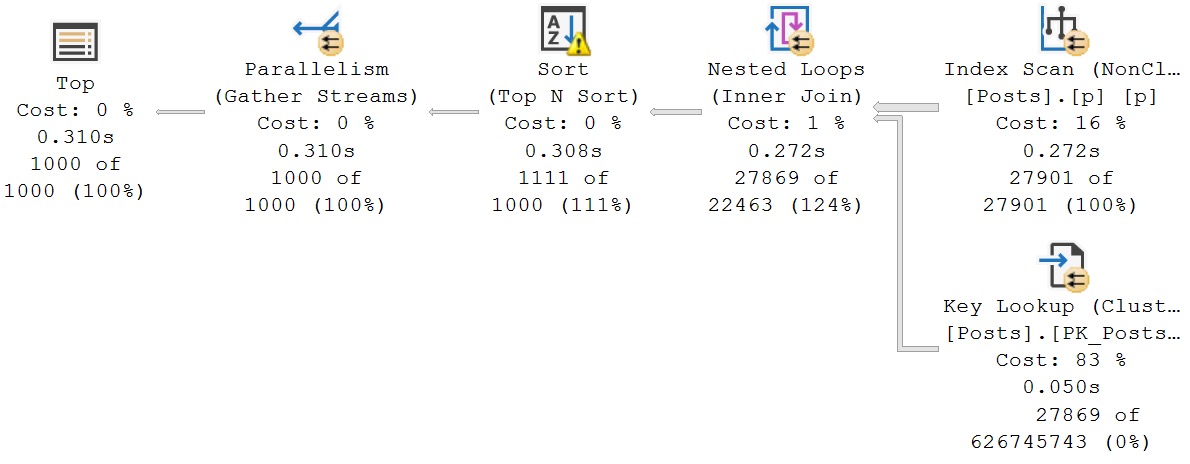
Here’s what I mean. This query has a Parameter List attribute.

sql server query plan
cool, cool

This query won’t have the Parameter List attribute, but that’s okay. We can see what got used as a literal value.

sql server query plan
don’t despair

Plumbing


This all comes down to the way statement-level recompile hints work. They tell the optimizer to compile a plan based on the literal values that get passed in, that doesn’t have to consider safety issues for other parameter values.

Consider the case of a filtered index to capture only “active” or “not deleted” rows in a table.

Using a parameter or variable to search for those won’t use your filtered index (without a recompile hint), because a plan would have to be cached that safe for searching for 1, 0, or NULL.

If you’re troubleshooting performance problems using Query Store, and you’re dealing with queries with statement-level recompile hints, you just need to look somewhere else for the parameter values.

What this can make tough, though, if you want to re-execute the stored procedure, is if you have multiple queries that use incomplete sets of required parameters. You’ll have to track down other query plans.

But quite often, if there’s one problem query in your procedure, the parameter values it requires will be enough to go on.

Thanks for reading!

Going Further


If this is the kind of SQL Server stuff you love learning about, you’ll love my training. Blog readers get 25% off the Everything Bundle — over 100 hours of performance tuning content. Need hands-on help? I offer consulting engagements from targeted investigations to ongoing retainers. Want a quick sanity check before committing to a full engagement? Schedule a call — no commitment required.

A Follow Up On HT Waits, Row Mode, Batch Mode, and SQL Server Error 666

A Follow Up On HT Waits, Row Mode, Batch Mode, and SQL Server Error 666


Video Summary

In this video, I delve into the intricacies of SQL Server query tuning and the importance of batch mode versus row mode execution plans. Starting off by discussing my recent accolades from BeerGut Magazine, I highlight how these awards reflect both the unique challenges and successes in managing a consultancy with a static team. The primary focus shifts to explaining the differences between hash join weights in batch mode and their absence in row mode query plans, emphasizing why reducing batch mode weights can lead to faster queries by minimizing the number of rows processed. Additionally, I explore real-world scenarios where multiple distinct aggregates in row mode queries can lead to significant performance issues, such as hitting system-generated unique value limits, which can result in errors even when only running a SELECT statement. This video aims to provide practical insights and solutions for optimizing query performance across different SQL Server editions.

Full Transcript

Erik Darling here with Darling Data. Recently voted by BeerGut Magazine to be the SQL Server Consultancy with the best employee retention rate, which was coupled with kind of a strange additional accolade in that it was also the slowest growing SQL Server Consultancy on the planet, because I haven’t hired anyone in five years. which I’m never going to, so it’s not that I wouldn’t enjoy working with someone, it’s just that I can’t imagine anyone in their right mind ever wanting to be managed by me. It would be a nightmare for you. Nightmare for anyone. So this is a bit of a follow-up video to the last video I recorded about the HTDeleteWeights. And I need to do two things here.

I need to show show everyone the row mode version of the query that I talked about. And I also need to expand a little bit on what exactly was going on with the, well, a more, a little bit closer to what was actually going on in reality with a client query that I was tuning. Now, the HTDeleteWeights, or the HTWeights in general that I was talking about in the last video, I don’t think that they are necessarily a scalability problem. I don’t think that it was their fault that the query was slow. I think that much like any other wait, the CX weights, LCK weights, page latch, latch weights, page IO latch weights, anything like that, you can use them to figure out what’s going on when your queries might be slow and what you might need to do to fix them. They are not on their own. It’s not like spin lock contention or anything weird like that. It’s just, you know, something that you might see in a query plan. You might wonder, what the hell’s going on here?

And I wanted you to know what to look for, which is the hash joins and hash match aggregates and running in batch mode and how you might be able to reduce those weights to get a faster query, namely by having fewer rows go into the joins and the aggregates, your batches going into them, because the fewer batches and stuff you have going into them, less of those weights you have, the faster your query goes. So that’s the first thing. The second thing is the row mode version of that query plan will of course not have any of those HT weights in them. You will just have a whole lot of sort of weird parallel CX type weights in them because obviously HT weights don’t show up in row mode plans and parallel exchanges, right?

Like, you know, repartition streams and, well, there’s another repartition streams. There’s a gatherer streams over there, which is, you know, maybe not the most interesting thing in the world. I don’t think there’s a distribute streams in this because we don’t go from a serial zone in the plan out to another parallel zone in the plan anywhere.

So there’s no need to distribute streams. We just need to repartition streams and gather streams at the very end. So this whole thing runs for, I don’t know, 30, 40 seconds more.

Well, actually, well, thanks operator times. That’s 236. That’s 241. That’s 232. These are all 232. That’s 234 over there.

Do we have anything else interesting going on in here? No, not particularly, I don’t think. Anyway, parallel exchanges and row mode plans can make operator times look really weird. And I think one good sign that you should start getting batch mode involved in queries, which is what I did to make that query faster than it was before, was get batch mode involved because, you know, when you’re processing lots and lots of rows, aggregating lots of rows, batch mode is usually way, way better than row mode, unless you’re on standard edition, because Microsoft has taken you out at the knees by limiting batch mode’s degree of parallelism to two, no matter what.

You can put all the max.p hints you want. You can say max.p 1 billion, and you still get a maximum degree of parallelism of two for your batch mode queries in standard edition. So thanks, Bean Counters.

I guess the $200 billion a year wasn’t enough. You need to squeeze people on standard edition even harder. Then you squeeze people on enterprise edition.

That’s just really sweetie. Real great folks. Anyway, so this is the row mode version of the query that I ran in batch mode where I talked about the HT to lead weights.

The weights for this one are, you know, whatever. There’s a lot of stuff in here that you might see and might be a pretty good indicator that, you know, your query was, like, contentiously parallel or something.

You might want to do some stuff to try and help SQL Server out. Maybe, you know, temp table, early grouping. Like, I showed two different ways to sort of address the HT weights in the batch mode query.

You could do the exact same thing for the row mode version of the query. Like, you could, you know, do what I did and dump some stuff into a temp table first. Or you could do what Joe Obisch did and have sort of two separate grouping queries to reduce the rows that end up falling from one parallel thing to another.

Either one is a valid choice. I don’t see anything wrong with either one. It’s just about whatever works better for the query that you’re trying to tune.

So, in real life, in real actual life, the query that I was running had some other stuff going on in it that made it really, really bad in row mode. Namely, it had a couple distinct aggregates in it. We had one here where we’re counting distinct post IDs and one down here where we’re counting distinct comment IDs.

And in the query plan for that, boy, howdy, let me tell you, things got real ugly. So, in row mode, when you have multiple distinct aggregates, SQL Server does some funny business in the query plan. Now, you can see this, oh, wait, that’s the wrong one.

There it is. This query, or this query plan, ran for a really long time. The operator times that you see here are misleading.

I forget if the query time stats for this ended up being anywhere near accurate for exactly how long it was running, but that’s what that was. But the real big problem here is that this query actually errors out. So, when I run this query on its own, I get an error message.

A big, nasty error message. All this stuff in red here. We’re at the maximum system generated unique value for a duplicate group was exceeded for index with partition ID, whatever.

Try dropping and recreating the index. Might fix it. Otherwise, try another clustering key.

What’s interesting here is what I’m not doing in this query, I’m not inserting data anywhere. It’s just a select. But in the query plan, we have spools.

And you can see that this spool didn’t really get much of anything. And, well, we had this big old thing over here. But this spool, when SQL Server, I guess, was trying to build it or trying to do something with it, we actually hit that error message.

This query failed while this spool was building. Which is crazy, right? Insane to think about.

So, the real value of batch mode here is in batch mode. And I blogged about this before. I’ll find the post and stick a link to it in there. When you use row mode to calculate multiple distincts, you end up with these nasty parts in your query plan here.

And if you tried to build too big of a result set, you might hit that same 666 error that I hit. This was not intentional. This is just a query that runs for a really long time and then fails in row mode.

Runs a little bit longer in batch mode. But, I mean, not longer than this. Didn’t run for an hour, 22 minutes, and 47 seconds. Which is down here.

If I move far enough out of the way, you can… Oh, green screen. You’re a jerk. Casting shadows, I suppose. At least you know I’m not a vampire now because the shadow that I cast on my green screen just ruined this entire video.

Thanks a lot. And we can see over in query store that this particular… If we use my wonderful, beautiful, gorgeous store procedure that IntelliSense is picking on, SP underscore quickie store, and we look for queries that have run and failed with an exception, we’re going to have a couple in there.

One of them is a different thing that I was actually working on today that I’m going to record a different video about. But this query up here is the one that hit that 666 error. And if we look at how long it ran for, of course, the hour and 22 minutes.

Well, I mean, that’s almost 5 million milliseconds of wall clock time. And just about, well, a little bit less of CPU time. And the waits for this are really weird, too.

Like in query store, well, using SP quickie store, I show you the waits that the query waited on while it was running. And you can see those up here, right? All this stuff it was waiting on.

50 million milliseconds of parallelism, 893,000 seconds of idling. Which doesn’t seem like a good time to me. And then, you know, 16 seconds of CPU time, 12 seconds of memory, and 7 seconds of other disk.

What other disk? I don’t know. The D drive?

Was it the H drive? Was it the F drive? Was it the T drive? We have no idea what drive it was. All we know is that this query died a very dishonorable death building up a spool and a query plan in row mode. So, really, the value of batch mode in tuning this query, like what I showed you was like the finished product.

I didn’t show you kind of where this started because I already had enough to talk about with the finished product. So, if you’re, I mean, if you have row mode queries that calculate distinct, especially multiple distincts in them, you would be doing yourselves a big, big favor to, if you do what you can to pre-aggregate data.

So, like, if you’re on enterprise-y edition of SQL Server, you just might want to get batch mode going because calculating multiple distincts in batch mode doesn’t suck. If you’re on standard edition, then you might want to do some pre-aggregating of the data so that your final query, when you calculate multiple distincts, doesn’t have to do as much crappy work because query plans for multiple distinct aggregates would be pretty awful in row mode.

I think that’s about it on this one. I think that’s all I had to say here. This is the first time in a long time that I have such a backlog of interesting SQL Server stuff to talk about that I’m going to be recording videos and writing quite a bit over the next week or so.

So, if you like this sort of thing, here’s the big sales pitch. If you like this sort of thing, you like this sort of free SQL Server performance tuning content, you do me a huge favor by liking this video, little thumbs up icon somewhere along the bottom here.

I don’t know exactly where. If you want to keep getting notified when I release these magnificent, perfect videos that prove I’m not a vampire, you can subscribe to the Darling Data channel.

If you’d like a subscription to Beer Gut Magazine, you can send me money. I don’t know how much. Just whatever you have.

Whatever’s in your pocket, just empty them up. It’s worth it. We’ll pass around a little collection tray on that. But anyway, I hope you enjoyed yourselves. I hope you learned something.

I hope that you’ve had a great day. It’s Monday. I hope you’re coming off a great weekend. And I will see you in another video probably tomorrow when, after I’ve drank enough blood to stain me. Anyway, thank you for watching.

I’m going to hit that stop button now. Goodbye.

Going Further


If this is the kind of SQL Server stuff you love learning about, you’ll love my training. Blog readers get 25% off the Everything Bundle — over 100 hours of performance tuning content. Need hands-on help? I offer consulting engagements from targeted investigations to ongoing retainers. Want a quick sanity check before committing to a full engagement? Schedule a call — no commitment required.

Performance Tuning Batch Mode HTDELETE and HTBUILD Waits In SQL Server

Performance Tuning Batch Mode HTDELETE and HTBUILD Waits In SQL Server


Thanks for watching!

Here’s the demo query, in case you’re interested in following along.

SELECT
    u.Id,
    u.DisplayName,
    u.Reputation,
    TopQuestionScore = 
        MAX(CASE WHEN p.PostTypeId = 1 THEN p.Score ELSE 0 END),
    TopAnswerScore = 
        MAX(CASE WHEN p.PostTypeId = 2 THEN p.Score ELSE 0 END),
    TopCommentScore = 
        MAX(c.Score)
FROM dbo.Users AS u
JOIN dbo.Posts AS p
  ON u.Id = p.OwnerUserId
JOIN dbo.Comments AS c
  ON u.Id = c.UserId
WHERE EXISTS
(
    SELECT
        1/0
    FROM dbo.Votes AS v
    WHERE v.PostId = p.Id
    AND   v.VoteTypeId IN (1, 2, 3)
)
AND  u.Reputation > 10000
AND  p.Score > 0
AND  c.Score > 0
GROUP BY 
    u.Id,
    u.DisplayName,
    u.Reputation
ORDER BY
    TopAnswerScore DESC
OPTION
(
    RECOMPILE, 
    USE HINT('FORCE_LEGACY_CARDINALITY_ESTIMATION'), 
    USE HINT('QUERY_OPTIMIZER_COMPATIBILITY_LEVEL_140')
);


Video Summary

In this video, I delve into batch mode performance issues in SQL Server, focusing on weight types that can indicate potential problems. Erik Darling from Darling Data kicks off by discussing the nuances of batch mode execution plans and how they differ from row mode, particularly when dealing with columnstore indexes. He highlights the importance of understanding memory grants and cardinality estimations, which are crucial for optimizing query performance. I then walk through a specific query plan, pointing out where things go awry due to misestimations and spills, and introduce HT wait types as key indicators of these issues. The video explores two potential solutions: one involving the use of temporary tables to contain misestimations, and another from Joe Obish that leverages derived tables for more efficient row handling. Both approaches aim to mitigate performance bottlenecks in batch mode queries, offering practical insights into optimizing complex SQL Server operations.

Full Transcript

Erik Darling here with Darling Data, the cup of just coffee. You know what, I’m going to refrain from, try to refrain from drinking this while I’m recording because I don’t want anyone to suffer hearing me eventually swallow a coffee while I’m on microphone. An awful noise. I’m going to get on one of those conference calls where, like, someone doesn’t mute themselves and he doesn’t hear anything. hear them, like, constantly slugging away from a 64-ounce growler of water and it’s just gulping the whole time. Drives you bonkers. Drives you bonkers. Worse, worse than the, the low, low battery fire alarm, dogs and kids in the background. You know, it’s just someone completely unaware of how gross they are. Anyway, today’s video, uh, we’re going to talk about, uh, uh, a weight, well, a group of weight types that can be indicative of batch mode performance issues. Uh, and I’m going to start by showing you around the query, some of the indexes that I have, uh, the query plan. Then I’m going to show you the weights and I’m going to show you some ways to potentially fix those weights. Now, the weights that I’m talking about today, I’ll start with the letters HT.

There are four or five of them that all, uh, belong to the, uh, batch mode operations in a SQL Server query plan. Of course, batch mode most common when there are columnstore indexes involved. And batch more, batch more is usually a pretty great thing, especially for queries that process a lot of data can be far faster than row mode. Um, not always in standard edition because standard edition is hopeful, hope hopelessly hobbled by Microsoft. Uh, and you only see a lot of data. You only get a dot of two with, uh, a maximum dot of two with any batch mode. Uh, well, I mean, indexing query plans, query operators. Uh, so you can, you know, uh, sometimes you’re better off doing other things in standard edition, uh, that, that still allow you to have a higher dot. Uh, at least for me in standard edition, I’m a pretty big proponent of, uh, of, of, of indexed views. Uh, because indexed views are really good at doing, uh, pre-aggregations of large amount of data, large amounts of data, uh, but they, that they have no dop limitation the way batch mode.

So, uh, uh, a topic for another day, but, you know, just figured I, I give you as much information as I can in these things so that, uh, you don’t walk away feeling, you know, feeling like I robbed you of your time. So let’s talk a little bit about this query plan in front of us. Uh, the, the parts that are slow, why it’s slow.

So, and, uh, then we’re going to look at the weight stats behind this one. Now, this query, uh, at least, you know, for the most part is pretty quick up until we get to these hash operations. And I guess I didn’t need the sort in there because I just said the hash operations and then I circled a sort operator too.

So in batch mode execution plans, uh, where they differ from row mode execution plans is that, uh, rather than parent operators, uh, also, uh, sort of showing the time that their child operators executed for. So, like, if you have an index scan that takes a second and then the next thing you have is, like, uh, like an aggregate that takes two seconds in row mode. Those, like, the aggregate took one second and the scan took one second, but the, but the aggregate shows you two seconds because it’s the one second it took plus the child operator below it.

In batch mode, it’s different. Because in batch mode, every operator is just responsible for its own time. So really, this plan is pretty quick until we get to a hash match inner join and the hash match aggregate.

Now, these operators spill. We can tell that they spilled to disk because they have these helpful little exclamation points on them that says, oh, dear, something terrible has happened. Please pay attention to me.

And you can kind of get a sense of why this happened. Because, uh, when SQL Server came up with this query plan, it came up with another, another set of things that it said, that it said it needed. Aside from the operators here, it came up with a memory grant.

And it asked for a memory grant based on the cardinality estimation that it did when it was first figuring out, like, where do operators go? So the memory grant that it asked for was way too small for the amount of data that ended up flowing through some of these. Now, you can kind of start to see where things fall apart cardinality estimation-wise pretty early on in the plan.

So let’s frame this above here, and you can see at this operator, we got 383% more rows than we expected. At this operator, we got 426% more rows than we expected. At this operator, we got 4,400% more rows than we expected.

At this operator, we got 1,500% more rows than we expected. At this operator, we got 573% more rows than we expected. And at this operator, we got so many more rows than expected that the number is cut off.

But if you look at the scale of these two numbers right here, you can probably get a sense of, like, you know, wow. Orders of magnitude, whatever those are. There are a lot of extra digits in this number that are not in this number.

So they’ve got way more rows than anticipated. And so we just didn’t have enough memory to process all that stuff without spilling to disk. This one doesn’t do too bad.

But, you know, it still spilled, right? It still took a minute and 43 seconds just on its own of spilling, right? That’s what this number is right here.

So this took a minute and 43 seconds, and this took a full minute. So these operators did not do well. Now, we failed these operators pretty miserably. So while this thing is executing and taking, where is it, two minutes and eight seconds to finish, what it is primarily waiting on, aside from parallelism waits, which also suffer because of this.

Now, so, again, we can, not again, this is the first time I’m saying it. We can tell this is a parallel plan, but we can tell by looking at little operator icons here. These are my little racing stripes, right?

My go fast buttons. Parallelism is also hurt by things like spilled for a couple reasons. One is thread synchronization, and the other is that, you know, like when we were talking about memory grants, what happens is SQL Server, when it comes up with a memory grant, it comes up with a memory grant when the plan is a serial plan.

Parallel plan exploration happens later, assuming that your query passes the cost threshold for parallelism, and nothing is keeping it from going parallel. So what SQL Server does is it takes the memory grant for the serial plan and divides things evenly amongst the dot threads that get assigned to the parallel plan.

So what you have is a bunch of parallel threads, you know, that need to, like, do some stuff in memory, spill to disk, read back from disk, then go and process stuff. So you can see parallels and waits get really, really weird in any plan that spills because you might have one thread that spills, you might have four threads that spill, depending on what your dop is, you might have eight threads that spill, which is the case here.

So all of these threads have to wait to sort of do their parallel synchronization stuff while they’re doing the spilling and reading back from disk, which is all sort of just a generally bad time for those parallel threads.

So you would see parallel waits get really, really high, potentially, for queries like this where parallel threads are all spilling because the spilling hurts the parallel thread synchronization and whatnot. But the waits that really drive this query crazy are all these HT waits.

HT build, delete, memo, repartition, re-init. Now, being honest here, you know, I showed all the HT waits, but these bottom three hardly get impacted.

The real ones that hurt in this plan are HT build and HT delete. Now, if we look at, okay, let me frame this a little bit better. There we go.

So if we just focus on these top two waits, I’ve done some math on a DMV that is available in SQL Server 2016 plus called DMExecSessionWaitStats, which breaks, which has for any like open session doing stuff that hasn’t closed out, whatever, it holds on to wait stats at the session level.

So you can really monitor what’s happening for a particular session weight-wise while the query is running and after it’s done. So this particular query, it didn’t have a lot of waits on those, right? 672 on HT build, 1008 on HT delete.

But look how many seconds and minutes we racked up in the two minutes that query ran for because those parallel threads were all like emitting these particular waits.

And these parallel threads were all dealing with spills and other nonsense. Now, you don’t have to have big spills in a batch mode query plan for these waits to show up. They show up primarily, well, actually, I think they show up specifically for hash operations.

So hash joins and hash aggregates is really where these waits start to show up from. And you don’t have to have spills for this to happen. You can get these just from like terrible misestimations in your query where, you know, more rows show up.

Even if you don’t like, you know, run out of memory and spill the disk, you can still hit these waits pretty hard in queries where there’s just bad estimates. So we, during the two minutes that query ran, I think this is the most particularly interesting column in there.

There’s one other really interesting one, but the wait time in minutes, six minutes of HT build and five minutes of HT delete while that query was executing for two minutes.

If we look at the max wait time in seconds for some of those, 29 seconds for a max wait time, right? That’s seconds.

29 seconds we waited on this wait, like once. Like that was the max wait time that we had for it. And ditto the HT build below it where 37 seconds was the longest recorded wait on that wait, on the specific wait type while that query was running for two minutes.

So pretty wild stuff in there, right? So again, coming back to, again, these, these waits, not, not your friend when they start piling up in this way.

And coming back to the query plan, you know, we have a lot of stuff where misestimates are happening. Now, there were two ways that, or there are two ways that I’ve come across to sort of solve for this.

One of them was, I mean, mine, this was, this was mine. And the other one was from Mr. Joe Obish, who I showed the query, because he’s great with, with batch mode stuff.

And so I was like, going on with these waits, he came up with a slightly different rewrite that is a little bit slower than mine, but doesn’t use a temp table. So we’ll forgive Joe, we’ll forgive Joe by a few seconds on that.

So what I did was I took the initial join between the users table and post table with the exist check on the votes table. I stuck that into a table called pre-check, and then I went out and I joined off to the comments table afterwards. Now, the reason why this, this rewrite made sense to me is because when I was looking at this query, what kind of happened is like whenever, every time, like no matter like how I did this, or rather with any demo query that you write using the Stack Overflow database, as soon as you join from users, like two posts or two comments or something like that, there’s like this real, like amplification because users is one-to-many with posts, users is one-to-many with comments.

And when you join out, you get two one-to-many relationships. And then the one-to-many, like the two one-to-many relationship joins just kind of make everything go wild. And they make cardinality estimation probably really difficult, especially join cardinality estimation.

Now, I tried both the legacy cardinality estimator and the default cardinality estimator. Neither one provided a whole lot of help for this particular set of joins. So, you know, no shining example of one being vastly superior to the other there.

So, in my head, what I thought made sense to do would be to sort of self-contain a little bit of the misestimation. So, using a temp table, we still see some, we still see the sort of bad estimate row explosion when we come here at 369% and here at 816% and here at 1,544% and here at 6,166%.

But we stabilize that result set in the temp table here. Now, SQL Server knows there’s 13,000 rows in this temp table. And since we use the temp table instead of a table variable, SQL Server is able to generate some statistics on this.

This doesn’t fix everything, though. This doesn’t fix all of the cardinality estimation down here because when we go and look, SQL Server is like, yep, 13,000 rows here, got that.

But the cardinality estimate down here still stinks and the cardinality estimate here still stinks, but it’s self-contained, right? It’s not like affecting other parts of the query plan because it’s off by less than it was in the original query plan where it’s off by like some giant number because there was just order of magnitude, several of those more rows coming out of one of the joins than SQL Server was expecting.

So we can contain things a little bit with a technique like this. Another thing we can do is, oh, what’s in this window? Oh, that’s a different thing.

We don’t have to worry about those last two windows. I was like, I wonder what’s going on there. This is what I get for not saving files and naming things. So that was my attempt at a rewrite. Joe Olbich’s attempt at a rewrite is this one where he sort of, rather than using a temp table, he uses two derived selects in this way.

So in the first one, he joins from users to posts with the existence check here and takes care of all that. And then he does an inner join down here between users and comments and does all the right grouping and stuff in there and then joins the two derived tables back to each other.

And Joe’s plan, for what it’s worth, and we can still see where the misestimations hit, but again, they’re a little bit more self-contained than they are when it’s just, you know, when all the joins are just sort of done in one step of things.

We get some rows eliminated because we do a join from users to posts, and then in another chunk of the query, we do a join from users to comments, and so we get some row trimming down in those portions.

So Joe’s whole thing takes about 6.4 seconds, which is pretty sweet, right? It’s much better than the two minutes and eight seconds, nine seconds that the other one took. Pretty brutal.

But you can kind of see what Joe had going on in here. Let’s make this a little bit bigger so we can frame things up a little bit more nicely. But you can see where Joe does his join between users and comments. And this is, again, very instructive of how the optimizer works, where even though we wrote this part of the query in the, like, the inner join, the derived inner join after the first part that joins from users to posts, SQL Server did this part first.

So the optimizer was like, I have a feeling about this. We still get the bad estimates. And this isn’t Joe’s fault. And this isn’t anyone’s fault but SQL Servers. Holy cow.

All this weird stuff starts happening. All these estimates are really terrible. But they’re a little bit more self-contained, right? And we get some row elimination from doing each join separately in sort of derived queries because we’re able to eliminate some rows that would have just kind of been flying through the query plan when the original query where everything was just written in one straight shot.

So there’s a lot of bad estimates still going on in here. But this plan actually recovers pretty nicely from them. These aren’t even real numbers anymore, I don’t think.

It’s just insane stuff. So Joe’s query does pretty well there, I think, for not using a temp table. My query that uses the temp table, oh, that’s 6.4 seconds.

My query that uses the temp table is, oh, just a little under 2 seconds, about 1.3 seconds there and about 500 milliseconds there. So just a little 1.8 seconds, 1.9 seconds if you really want to do some extra math.

I want to do. We just want to sit here with our plain cup of coffee. Gloat a little bit.

So, yeah. When you’re working with batch mode queries, and again, I love batch mode for a lot of things. This query in row mode is an even bigger disaster.

But when you’re working with batch mode queries, if you see lots of weights within your batch mode queries on these HT weights, specifically HT build and HT delete, you can run really bad performance issues sometimes.

And one way of fixing them is to sort of help SQL Server make better estimates, eliminate more rows, use a temp table, rewrite the query to sort of isolate different parts of it a little bit better.

And you can see really big performance improvements when you do that sort of thing. So, be careful out there. If you’re tuning an individual query, always make sure that you’re looking at weight stats in the query plan.

Those are available if you right-click on the root operator and you go down here and, you know, typical Microsoft SSMS 1, 10, 2, 3, 4, 5, 6, 7, 8, 9. The 10 is right where it belongs, obviously, right?

That’s a smart sorting there. That bubble sort? That bumble sort. Hard to figure out sometimes. But SQL Server will show you the weight stats for your query.

There’s HT build. There’s HT delete. Should be a CX port down here if we zoom in. But here’s our top two. And these, of course, in milliseconds.

So, you have to do your own math out there. If you’re looking at a server that processes a lot of batch mode stuff, you’re looking at the server-level weight stats, then you should really keep an eye out for the HT weights, especially if there’s a long average milliseconds per weight or long max weights recorded on those.

Because they can be indications that you have some hash operations and batch mode plans causing some big performance problems. So, keep an eye out for that stuff.

I think that’s probably good for today. Or for now, anyway. It’s about 20 minutes in, which is longer than I expected. But, you know, perhaps it’s a nice gift for someone out there. Thank you for watching.

Hope you learned something. I hope you enjoyed yourselves. If you liked this video, please give it the old thumbs up. If you don’t, I don’t know, go collect rocks, I guess. There.

You produced something. If you like this sort of SQL Server performance tuning content, subscribe to my channel. I publish this stuff fairly often. And I’m also rebooting my…

I mean, I hesitate to call it a podcast because it’s really just sort of me talking with Joe Obish about SQL Server stuff. But you can call it whatever you like. But I’m reviving that.

That’s the Bit Obscene Show. Radio Show. Let’s call it a radio show. I don’t like podcasts anymore. It’s a Bit Obscene Radio. So, anyway, keep an eye out for those. Keep an eye out for more videos.

And I will see you in another video at another time. Not today, though, because I’m losing sunlight. All right.

Thank you for watching.

Going Further


If this is the kind of SQL Server stuff you love learning about, you’ll love my training. Blog readers get 25% off the Everything Bundle — over 100 hours of performance tuning content. Need hands-on help? I offer consulting engagements from targeted investigations to ongoing retainers. Want a quick sanity check before committing to a full engagement? Schedule a call — no commitment required.

Join me at DataTune in Nashville, March 8-9 2024

Spring Training


This March, I’ll be presenting my full day training session The Foundations Of SQL Server Performance Tuning.

All attendees will get free access for life to my SQL Server performance tuning training. That’s about 25 hours of great content.

Get your tickets here for this event, taking place Friday, March 8th-9th 2024 at Belmont University – Massey Center 1900 Belmont Blvd, Nashville, TN 37212

Here’s what I’ll be presenting:

The Foundations Of SQL Server Performance Tuning

Session Abstract:

Whether you want to be the next great query tuning wizard, or you just need to learn how to start solving tough business problems at work, you need a solid understanding of not only what makes things fast, but also what makes them slow.

I work with consulting clients worldwide fixing complex SQL Server performance problems. I want to teach you how to do the same thing using the same troubleshooting tools and techniques I do.

I’m going to crack open my bag of tricks and show you exactly how I find which queries to tune, indexes to add, and changes to make. In this day long session, you’re going to learn about hardware, query rewrites that work, effective index design patterns, and more.

Before you get to the cutting edge, you need to have a good foundation. I’m going to teach you how to find and fix performance problems with confidence.

Event Details:

Get your tickets here for this event!

Going Further


If this is the kind of SQL Server stuff you love learning about, you’ll love my training. Blog readers get 25% off the Everything Bundle — over 100 hours of performance tuning content. Need hands-on help? I offer consulting engagements from targeted investigations to ongoing retainers. Want a quick sanity check before committing to a full engagement? Schedule a call — no commitment required.

Comment Contest: To Celebrate Groundhog Day, Let’s Celebrate The Groundhog DBA (Or Whatever)

Facing Up


When you’ve been working with the same technology for long enough, especially if you’ve found your niche, you’re bound to find yourself having to solve the same problems over and over again with it.

Even if you move to a new job, they probably hired you because of your track record with, and skillset in, whatever you were doing before.

One thing I do for clients is review resumes and interview applicants for developer/DBA roles. There are some laughable ones out there, where someone claims to be an expert in every technology they’ve ever touched, and there are some ridiculous ones out there that are obviously copy/paste jobs. I even came across one resume where the job description and qualifications were posted under experience.

As a performance tuning consultant, even I end up fixing a lot of the same issues day to day. There are, of course, weird and cool problems I get to solve, but most folks struggle with the grasping the fundamentals so bad that I have to ~do the needful~ and take care of really basic stuff.

There’s something comforting in that, because I know someone out there will always need my help, and I love seeing a client happy with my work, even if it wasn’t the most challenging work I’ve ever done.

Anyway, to celebrate the times where we’ve gotten to come out of our groundhog holes (I’m sure they have a real name, but I’m not a groundhogologist), leave a comment below with a cool problem you’ve gotten to solve recently.

The best comment (judged by me), will win free access to my SQL Server Performance Tuning Training Library.

In the case of a tie, there will be a drinking contest to determine the winner.

Thanks for reading!

Going Further


If this is the kind of SQL Server stuff you love learning about, you’ll love my training. Blog readers get 25% off the Everything Bundle — over 100 hours of performance tuning content. Need hands-on help? I offer consulting engagements from targeted investigations to ongoing retainers. Want a quick sanity check before committing to a full engagement? Schedule a call — no commitment required.
bit Obscene Episode 1: What Developers Need To Know About Transactions

bit Obscene Episode 1: What Developers Need To Know About Transactions


In the inaugural episode, Joe Obbish and Erik Darling talk about how developers use and abuse transactions, and some surprises you might run into for them.

Links:

  • https://erikdarling.com/the-art-of-the-sql-server-stored-procedure-transactions/
  • https://erikdarling.com/batching-modification-queries-is-great-until/
  • https://www.youtube.com/watch?v=CuZSoZb8ziE
  • https://michaeljswart.com/2017/07/sql-server-upsert-patterns-and-antipatterns/

Video Summary

In this video, I delve into the world of SQL Server transactions and share insights on what developers need to know about them. Joining me is my special guest co-host, Joe Obish, who brings a unique perspective from his time in the Wisconsin State Penitentiary library. Together, we tackle common misconceptions and bad habits that can lead to data loss or corruption. We explore scenarios where simple delete-insert patterns can fail, emphasizing the importance of using transactions to protect your data integrity. By understanding these potential pitfalls, developers can write more robust code and appreciate the value of transactions as a safeguard in an unpredictable database environment. Whether you’re just starting out or looking to refine your TSQL skills, this video offers valuable lessons on handling uncertainties and ensuring data reliability.

Full Transcript

Hello and welcome to the very first recording of our podcast, probably yet to be titled. And today, my special temporary guest co-host is Joe Obish. And Joe Obish, if you would like to introduce yourself a little bit, so people who may have forgotten who you are and the break you’ve taken from publicly berating SQL Server, why don’t you tell the nice folks why they should pay attention to you? Well, as we said before, this is part of my public rehabilitation. I even, you know, dusted off my, my most impressive SQL Server shirt, right? You see the speaker here? Yeah.

I started SQL Server work in 2011. I remember when I used to think that wasn’t very long ago. You know, now I’ve got like gray hair and everything. It’s terrible. I’ve done a lot of great performance tuning. I’ve worked on servers as small as four cores and as large as 108. I’ve done some columnstore ETL work, some OLTP.

Don’t undersell that columnstore ETL work, you bozo. That’s some of your most impressive stuff. I know. So, the best presentation I ever gave and will ever give is on that subject. It’s way more impressive than what Eric did. Eric and I are going to do here. So, you know, if you make it to the end and think, you know, that was okay, but I want something even better. It’s on YouTube.

Eric and I’ll put, I’ll put the link in the show notes. Okay. Cool. So that people don’t have to go figure out how to spell your name and then figure out what you were talking about on YouTube. Okay. We’ll make, we’ll make that easy on people. Okay.

What, are you done? I mean, yeah. I don’t know. Did I forget something important? I don’t know. You tell me. It’s your, it’s your bio. You can, you can say what, you can keep going, say whatever you want.

No. No. No. All right. Well, I forgot to mention Joe is live from the Wisconsin State Penitentiary today. He’s in the library right now.

My name’s Erik Darling. I am a consultant extraordinaire. I do all SQL Server performance tuning work. And I have a blog and a YouTube channel. And those links will be in the show notes too, just in case anyone who finds me was unaware of the fact that I have, I have those things. So that’s fun today. We’re going to be talking about what developers need to know about transactions, because apparently developers really don’t know anything about transactions.

That’s been my experience that many developers when, when we’re, when I’m working with clients are using transactions and more like abusing transactions. And today we’re hoping to share some of our professional wisdom about transactions so that hopefully the developing, the developer community at large can start using transactions and stop abusing transactions. So Joe, take it away. And I’m just here for color commentary. Joe’s going to provide all the, all the audio genius for this one. So let’s, let’s go for it.

Joe, you’re going to share that screen or you’re using a nice way of, you know, saying that Eric’s making me do most of the work. Yeah. As usual. So specializing, you know, there’s, there’s not knowing a lot about transactions. And then there’s like, like knowing the wrong thing or like having bad habits.

Like I’ve worked at companies where the things developers, you know, they, I think they know they’d be better off. Knowing nothing. The primary relationship that developers had with the transaction log was it’s important to write as little data as possible to transaction log.

That was their like overriding consideration for how they wrote the code. And, you know, to be fair, I mean, there is some value in that, right? If, if you can do the same amount of work in a way that writes less data, that’ll be good for performance.

But this was taken to an extreme, you know, even to the point where in a big, you know, complicated ETL process, they would always batch their transactions. Both into the final destination of the recording database, but even on the staging database, which was, you know, a simple recovery model. It’s supposed to be a temporary workspace, but they were, you know, they’re batching those transactions because.

They were fighting against the transaction log. They weren’t working with it. They viewed as their enemy.

They, they, they wanted to give it as little data as possible. And that caused a lot of problems. Performance is bad. Scalability was bad.

Sometimes they would try to add new features to the ETL and they just couldn’t. They had some process. I forget what it’s called.

It was like some fixed process where, you know, if the ETL process for a table was, was canceled midway, they would then have a bunch of code that would try to undo the partial progress that was made because, you know, they, they, they weren’t using transactions in the way that they should. They were fighting against the whole concept. And I’m sure you can imagine how complicated and horrible that procedure was.

I sure can. So, so where, so in, in, in cases like that, where, you know, they just wanted everything to roll back, what, what, what prevented them from using something like set exact abort on so that they got, they got a more, they got a better rollback scenario from things. It was because, you know, to take the, one of the, well, it was because they would do something like, you know, say you’re loading a million rows into this table.

They’d load like a hundred thousand at a time, each in their own separate transaction. Oh. So it’d be something like, you know, if they load half a million, but then the customer cancels it or something, they would then have a fixed procedure that would run, which would, which would delete those 500,000 rows that they had inserted.

Oh. So yeah, like it was really something. That is, that is charmless for being honest.

I ended up. So that among other things. Makes me want to say that, you know, to, to any developers out there who, who are, who are listening or watching transactions are your friends.

They’re not something to fight against. They’re there for your benefits. Um, you know, it’s part of the way that the database can serve you.

Um, it, you know, it’s a way to protect the data and make sure that it is there. It’s a way for you to get the results you’re expecting. And it’s a way for DBAs and customers and your boss to bug you less.

Cause you know, if you write code and your code loads data wrong, well, that can be a big problem. So, you know, if you take, if you take nothing else away from this, I would, you know, leave with the sentence of transactions are your friends. Um, you know, and you know, like Eric has a lot more friends than me.

So, you know, like I’m kind of reduced to thinking of, you know, SQL Server transactions as, as being my friends, but, um, that’s, that’s, that’s, that’s just how it is. That’s, that’s why Joe names all those transactions. Oh yeah.

That actually is a thing. That is actually a thing. We’re, I, uh, making an executive decision that is not important enough to cover here, but you know, maybe in part two. All right.

So, all right, I’m going to try to share exhibit a, yeah, let’s do it. And. All right.

Can you see, uh, some. I see. We’re starting to share. We got some purple dots. Oh no. You know, it worked so well when you weren’t recording.

It really did. All right. Yeah. Let’s try it again. Um, maybe, maybe you’re, are you, are you connected to a VPN or something? No, I’m not connected to VPN.

Is it working now? There you go. Look at that. Worked instantly. All right. Great. Um, so Eric, this is going to be used in the quiz. So you need to pay real close attention to this.

Um, so let’s say, you know, your, your, your test or a civil procedure that either creates new record. If there isn’t one or updates an existing record and you, you know, you’re knowledgeable enough to know that that kind of pattern is called an upsert.

You, uh, do some searching on Google. You find yourself reading some confusing. Blog posts about like what the right upsert pattern you should use is. You know, it uses all kinds of things.

You don’t know if you’re not really big on reading in the first place. So you think, okay, whatever, I’m not going to do updates. I’m just going to delete the record if it’s there and then insert it. I’ll solve all my problems.

Now this code is kind of dangerous where if the procedure fails for whatever reason after the delete, but before the insert, you, you’ve then lost data. Mm-hmm.

So Eric, it’s a time for your quiz. Time for my quiz. Oh boy. What are the reasons you can think of as to why this procedure could fail after the delete, but before the insert?

Uh, I would say maybe if there is a trigger or a foreign key or something else that, uh, that would cause a conflict with the, with the delete. All right.

I actually didn’t have those. So you’ve already passed. Uh, can you think of any other reasons why? Any other reasons why? Um, let’s see why, why the delete would fail and cause the insert. The, the, the, the delete would succeed, but the answer would fail.

Uh, well, uh, we’re deleting an ID. So my, like, you know, the first thing that would come to mind would be some sort of constraint violation, but you know, uh, I guess, you know, if you’re already deleting, like, so I’m assuming that ID is the primary key of the table.

So if you’d already deleted that and then you went to insert the same value, then it wouldn’t be a primary key violation. Uh, yeah, I can’t think of, I can’t think of any quick reasons why the insert would fail. Maybe a deadlock, maybe, uh, maybe, uh, I mean, I’m going, I’m going back to triggers and foreign keys, but that’s, that’s, that’s, that’s about what I can come up with.

All right. Well, you have passed. Congratulations.

So, you know, just to go over the scenario again, it’s, you know, if, if, if we’re trying to update an existing record and the delete succeeds, but the inserts fails, we’ve then just wiped out that old record. So we, we’ve lost data. So that’s why this code pattern is dangerous. Now in terms of, you know, like I’m a pessimistic person when it comes to writing TSQL, I try to view it defensively, you know, like assume the procedure can fail at any point for any reason. And if it does make sure that the data you expect is still in the database.

So the things that I thought of were, um, you know, you could just have a hardware failure or a power outage. It’s a bit severe, but sure. I mean, Hey, I mean, you know, these, these things happen, right.

Janitor’s mopping knocks the power cord out. Yeah. No, I mean, I mean, Hey, it’s, I mean, you know, these, these, these, these, these things happen, maybe not all the time, but they happen. That’s true. And you wouldn’t want to lose your valuable data in table one. Yeah. Right. That would be a death blow for the business.

Um, maybe some DBA doesn’t like you and he, uh, kills the process. Um, sure. Long running or worse. They have, they have an automated script that looks for blocking and says, if there’s any blocking whatsoever that kill that speed.

I mean, and I’m, I’m, I’m sure that, uh, someone’s done that. Um, of course you could have a lock wait for the insert and you hit a client, uh, timeout. Sure. Um, someone could be patching windows or SQL Server, or, you know, maybe, maybe the trans or maybe 10 TB fills up and they just restart SQL Server all together to, you know, fix it. Cause that’s how you fix that. Yeah, totally. Oh, a failover.

Yeah. Uh, your transaction log could fill up, you know, um, if you make it all the way to the end, then hopefully, you know, developers watching won’t be causing those issues anymore. Um, yes.

There could just be some bug in, in a SQL Server that that makes it fail. Sure. Like you have a non yielding scheduler or just some, you know, just some horrible error. Um, yeah.

So I think, I think, I think what you’re telling people is that sometimes when they’re, they’re writing code, they need to think out something. So I think that’s what, what’s inside the code is what could go wrong with, with, with stuff, with stuff that’s happening in there. There is a greater world out there.

Which I think is what tripped you off. Cause it seems like you were focusing on just the code. Yeah. Yeah. No, no, no, no, no. I was, I was very focused on stuff that’s going on in the database, but sure. You’re, you’re absolutely right.

I was, I was in the developer bubble. So it’s my, is that the right word? My, um, I think so. Yeah.

Sounds great. I mean, those, those, those, those, those aren’t the kinds of words that we should be using. Um, and you know, like I’m sure all the developers who are, you know, dedicated and, uh, ambitious enough to watch this, they all write perfect code, but you know, someone could modify your code later. Or someone could modify the, uh, table schema.

Like, sure. Like what if, like, what if someone shrinks the size of that, uh, fire car column? Yeah. You know, whenever, whenever there’s a problem with my code, like to say, it’s not, it’s my, it’s perfect code in an imperfect world. So, you know, we just have to set the deal with the imperfections around us.

So, you know, even the most innocent looking at procedures, like you can fail for all kinds of reasons. Sure. At any time, at any moment.

And. Just like in life. Transacts. And transactions, you know, they can help you. All right.

So this is our improved code. Now, admittedly, this is not code that you should be using as a template. There’s still lots of things to complain about. Especially the format. You know.

Um, that aside, you know, at a bare minimum, I’ve added a transaction. So now assuming like, you know, reasonable configuration, like if the delete succeeds, the insert fails, that delete gets rolled back. And now you’re not just losing data because of, you know, some horrible gremlin in the database made your code fail.

So this is, this is why I say that transactions are your friends, you know, like they protect you from losing data. You know, there are a lot of bad things that can happen at any time in a database. Um, you know, and transactions can help you.

They can protect you and they can make your job easier. Sure. Um, now, of course, you know, if you’re doing this for real, you should look at Aaron, uh, Bertrand’s absurd. There goes your rehabilitation.

There goes your rehabilitation. Just, uh, use that. Aaron Booth Baronski. Hey, look, I’m like the president. I’ve had a stutter my whole life and I’m, uh, doing my best, you know, even if you have a stutter, you can still, you know, fly to such great heights as being a speaker.

Speaking at past summer 2019. That’s right. You got it.

The, the, the, uh, last good past summer. That was a great. It was a great one. Yeah. You were there.

I was there. I was there. We, we hung out. It was wonderful. All right. So Eric has passed the quiz. Um, the whole quiz.

Yeah. Like I said, you, you, you only had to get one. Oh, okay. Well, you know, I do like to set a little bar. Um, so switching gears here. Oh boy.

You know, sometimes you might find yourself running a stir procedure in production, you know, as part of troubleshooting. Mm hmm. Um, or really just anywhere else. Um, or really just anywhere else.

If, if that procedure fails. Your transaction might not roll back. And you can find yourself in a place where, you know, you have an open transaction without realizing it. And if your database isn’t using accelerated database recovery.

That can effectively cause a production downtime. Because while your transactions open, you know, if you’ve modified any data, you can’t have log reuse. You know, the transaction log can’t wrap around and roll back and rewrite over your changes.

Mm hmm. So, you know, like, I mean, I, I’ve definitely experienced this. I’m sure Eric has too, where, you know, someone has, someone has open transaction. They don’t know about a, a, a, a few hours pass and suddenly all kinds of code are, are, is, is just failing across the board.

Yep. Um, you know, the only, the only thing I can really say here is, you know, if your code fails, make sure you don’t have an open transaction. Um, how would one do that, Joe?

What are some techniques? They could close the SMS tab and it’ll, it’ll, it’ll give you a warning about, oh, you have an open transaction. So you want to close it.

You know, you could just type rollback transaction. Sure. If you have one to close it, if not, it fails, but there’s a, no big deal. Um, that’s what I would come up with. Or, but most, most, well, I mean, most developers don’t, or rather most applications don’t function by developers running queries for people in SSMS.

So, uh, I would. I’m talking about a, a, a, a, a, a. Oh, like an ad hoc scenario where.

Yeah. Someone’s doing something. Sure. Yeah. Uh, I mean, if you’re gonna, if you, I mean, so I, I think that if you’re going to use a transaction, uh, the things that you need to do to prepare that transaction for success are, uh, to use set exact abort on. So that, that ensures that everything rolls back, uh, not just the, the thing that failed.

Uh, I, and I also think that you need, you need to, uh, have a catch block on your code that if there’s an error, you can, you can, so that you, when, when, if there’s an error, I mean, not saying that errors are inevitable. If there’s an error, uh, you can make sure that, uh, you, you, you have a rollback command in that catch block and that you also have a good record of what error occurred, uh, by, by using some of the built-in error functions. Uh, and, uh, I think that, uh, you know, the, the throw command is mighty helpful.

Uh, you know, if you can throw, throw a raise error that maybe gives you some additional, so like if your code is using a loop or if your code is, uh, you know, setting any, uh, variables or using any parameters that you can, you can use, uh, raise error to sort of give you which, uh, which, like, part of the loop or like which, uh, parameter or variable values were part of the error. I think there’s a lot of stuff that, uh, people don’t put into code because, uh, it’s a lot of extra typing, but that all that extra typing can, can really, can really save your hide when, uh, you do have, uh, unexpected transaction failures. I think you’re absolutely right.

That’s why you’re here. The encounter with is though, you know, oh, well, but I have a thousand procedures and none of them do that. And, you know, I couldn’t possibly update them to do it all, or I’m calling some horrible third party procedure that I can’t modify. And, you know, they, they haven’t seen Euro wisdom, you know, they haven’t seen the light.

So they don’t know to do those things. Uh, what do you think about setting transact abort on as like a default connection setting? Uh, I think, you know, I, I wouldn’t be, I wouldn’t, I wouldn’t say no to it.

Uh, I wouldn’t say no to it out of hand. Uh, it might be overkill for some procedures, but, you know, for the, for the, even for the procedures that it’s overkill for, like, who cares? Like, like, like, I’d, I’d rather have it there to safeguard the ones that it’s not overkill for than to, you know, uh, have it, have it not on for ones that, you know, like, if it’s just a select query in a procedure, whatever.

Right. Like, or if it’s just like a reporting procedure, like, uh, then whatever, like who, who, this, if it, if like, what, like inserts to it, like the temp tables or whatever are going to roll back. I don’t care like, like for, for the, like, I view it as a good general guardrail for an application.

Uh, and you know, you can, you can make a choice in certain procedures to turn it off if you, if you really want to get crazy. But, you know, I think, I think that it would be a good general guardrail for, for most applications that I see, especially ones driven by third party vendors who are generally clueless as to how to work with SQL Server. If you had it on at the connection level, would you still add it at the top of every new procedure you’re making?

Uh, I don’t know. Uh, that might be a whole lot more work. I mean, it’s sort of like, sort of like if you think about, uh, you know, the difference between, so like, let’s, I mean, let’s say you had RCSI and snapshot turned on.

I wouldn’t go turn snapshot on for procedure unless I absolutely need it. Like, unless something specific about that procedure needed, like the specific behavior of snapshot isolation. Like I wouldn’t, I wouldn’t go and put that at the start of every procedure as well.

So like, you know, uh, I can’t think of a great reason to, to go into every procedure if you’re setting it on at the connection level and also set it on there. But, you know, maybe, maybe you’ve seen something interesting that I haven’t. No, I mean, I was just, you know, I find it a little bit odd that it seems like most of the online discussions about this are you should add to every procedure.

And very rarely do people say, oh, we’ll just turn it on at the, uh, connection level and then you’re done. You don’t have to do anything. Um, you know, like to your point, like technically you could get some bad behavior.

I think if you have, if you have an application already going, like you might have some badine error, like, you know, someone has some, someone tries to like close a cursor twice. Cause they just have something copy and paste or something. Sure.

And, you know, now that would be unable to execute. But I think in general, like, you know, it’s hard to imagine many scenarios where you want that setting turned off. I did do that once.

You, uh, should I, uh, talk about that? Yeah, go for it. Talk about that. So you can, you can talk about why you turned it off, turned it off once. And I’ll tell you, uh, how I use it. So you go ahead.

So, so this is the, uh, transact or what’s it, what’s the actual word? It’s kind of hard to say it’s a transact abort. Yeah. Exactly.

So, so for somehow, somehow X, somehow trans got turned into X. So it’s exact abort. Maybe it’s execution abortion. I don’t know. I’m pretty sure it’s exact abort. Cause you know, I mean, you wouldn’t want to, we wouldn’t have to type out trans every time.

Yeah. Right. That’s just too much. Exact abort. Um, so, you know, this is one of those things where, you know, I was reading, uh, a very lengthy and complete blog post about transactions by a, uh, famous European whose name I actually never known. Is it Erlen Somerskog?

Yeah. Yeah. That’s not, it’s not that hard. Well, it’s not that hard because you’ve, you’ve been there a bunch of times. You’re a very well-cultured person. Well, also, also it’s just, it’s just letters. Somerskog.

I mean, all words are just letters. Fairly easy to figure out at this point in life. All right. Well, like, like, I always have restraints. I have you here to pronounce the European names, so I don’t have to. Okay.

Um, so I, I think I ended up doing a thing that he explicitly warned against, but you know, it’s, I haven’t gotten fired yet. So, you know, it’s true. Um, so my scenario was I, I had a DML trigger and if that DML trigger failed for some reason, I didn’t want to roll back the, you know, insert or update. Sure.

You know, like, like we viewed it as better for the business to very occasionally not have that trigger fire compared to making the trigger failure cause the data not being inserted. Sure. So the way I did that was, uh, it was, it was horrible.

Um, I explicitly turned off exact whatever it’s called. Yeah. Exact. I used the transaction save points. Okay.

I, that I then checked if it was possible to roll back to the save point cause in some cases you just can’t. Mm-hmm. So, you know, for a certain small class of errors, if that trigger fails, we just roll back to the save point and we don’t cause the parent insert or update to fail. And it’s reasonable.

It, I don’t know about that, but it seems to work. From my point of view on this, you were tasked to do a somewhat unreasonable thing in SQL Server and you had a reasonable reaction to that set of unreasonableness. Sometimes when you have to do unreasonable things, they require unreasonable techniques.

So, uh, which, which actually like cancels out like two negative numbers. It makes the unreasonable technique reasonable. That’s a, that’s a very generous view to say, but it’s actually a great segue into my next one, which is bashing transactions in the database.

Okay. Um, I like had like a fire extinguisher analogy that I, I like really want to use, but it’s, it’s not quite perfect. I’m going to go for it anyway.

That’s fine. I don’t care. You know, a few things in life are perfect. I feel like batching transactions is often like using a fire extinguisher, you know, like, like it solves the immediate problem. But most of the time you might have a mess.

Yeah. To, uh, to a cleanup later. Um, I think that it’s easy to fall prey into the wrong mindset. Like, you know, you’re a developer, you’re writing your code, you don’t want people to bother you.

Some evil DBA says you’ve met developers before. Messages you and says, Hey, you know, you’re a code, fill up the transaction log. You, uh, you, you need to fix it.

You, you, uh, Google it. You find many other developers who have suffered in the same way you have. Yeah. And, you know, there are some smart people out there. It’s, oh, you know, instead of doing one big transaction, you can do a bunch of little transactions.

And then they just make that change. Yeah. And I feel like in some cases that’s perfectly correct. There’s no downsides, but I also feel like it gets into the minds of, you know, transactions are my enemy.

I need to work around the, uh, the, uh, the, uh, transaction log. So like, I’m a little bit concerned about the whole thing with that respect. Now, in the blog posts of yours that I’ve read, I remember you always saying something like, you know, it’s important to make sure that you are using transactions when you need to.

Like if, if a set of, you know, demo statements, either all needs to commit or no needs to commit, you need to use transactions. So in other words, you know, like don’t use batching when it isn’t correct from a business perspective to do so. Sure.

Well, I mean, my, my, my point of view on batching is that, uh, like there are times for several reasons when it is absolutely necessary to use, uh, any sort of, you know, archival process that you don’t have a partition table for that. You can quickly switch stuff out, uh, any sort of data migration process, uh, you likewise probably want to, want to batch. And, uh, anytime that like, so like there, there are times when I’m performance tuning queries that do modifications.

And even if a lot of rows aren’t being deleted in a, like by the, by the, you know, by the, whatever, uh, you know, update, delete, uh, because of the way the database is implemented, um, the, the slowest part of the plan is the part where you actually physically change the data. So it could be over indexing. It could be, uh, you know, foreign keys.

It could be triggers. It could be any number of things. It could just be like, you know, you’re on, you’re in like an Azure managed thing with like, but hardware or like unfair caps on the transaction log that makes throughput to it really slow. You know, there’s like, there’s like lots of reasons why like the modification is slow, right?

You could just have your like slow ass transaction log. Uh, so there are a lot of reasons why that could be slow, where I might even take, like, I might even take something that’s only changing like 2 million rows and batch that up into like, you know, 500,000 row chunks because like the actual data change part of the, of the, of the plan is the slowest part. So it sounds like you’re getting back into your, you know, you’re asked to do an unreasonable thing, like update millions of rows on, um, low end hardware as we like to call it.

So you got to respond. That wasn’t the analog. So, um, I try to always, I think the way that I would summarize it is if you’re going to batch your DML statements, make sure it’s okay.

If only some of the batches happen, because as we discussed earlier, you know, you’re coping to fail for all kinds of reasons. Sure. Some of which aren’t your faults at all.

Sure. And like, I’ve had, I’m sure there’s scenarios where it, you know, it would be okay for some of them to happen. Some of them that’s happened. Like there are some really great use cases for batching. Um, ones that I came up with are, you know, you’re deleting old data from an archive from a log that no one could be looking at.

Yep. Or you’re, you’re creating a new column that the application isn’t querying yet. You know, there, there’s no reason to load it all at once.

Mm-hmm. Or like backfilling the column, you mean. Yeah, yeah, exactly. Or, you know, you’re, uh, you, uh, have a, you, uh, have a downtime, you have a maintenance window. There are no end users during that wonderful brief period of time, you know, do all the batches you want.

Or, you know, like if you have to, you’re maybe doing some horribly complex thing on some, uh, local temp tables. I mean, you know, if batching is the way to do it, then go ahead and batch it because, you know, no one can see that data. Yep.

So, you know, all those scenarios share one thing in common, which is there’s no end user who can see the data while it’s being processed. Sure. I think if that’s not true, you need to really, you should think critically, you know, like, is it okay for them to just see like half the data if they just still happen to query at, you know, an unlucky time? You mean in the, in the unlikely event that the code isn’t full of no lock hints anyway, Joe?

They could just see whatever? Uh, yeah. See, it gets weird out there. So, I mean, again, this is, this is sort of the value of optimistic isolation levels where, you know, these things come into play a little bit.

I think it’s, I think though, I mean, I’m not a lacking expert, but even if people are using your recommended and favorite isolation level, um, RCSI, like, aren’t you kind of creating an invalid snapshot to a degree where, you know, the snapshot they might get is we’ve batched half the data as opposed to all or nothing. So, I do, I do feel like batching can be a little bit defeating even with RCSI on too. Sure.

Uh, you know, I mean, you, you, I mean, you’re, you’re right. If, if, if, you know, if it’s a situation where like you just like, we’re like, you know, if, if a user sees like the first part of your batch, but not the second three parts of your, like the next part looks like three parts of your batch or whatever, then, uh, yeah, that, that could, that could potentially be awkward. But at the same time, I think one of the values of batching is that, uh, if the user hits refresh enough times, they’ll, they’ll, they’ll eventually see the right data, which is.

Yeah. Yeah. Eventually might be wrong time, but yeah, no, it’s like, you know, I, I think patching at this place, I have seen a few blog posts that don’t even talk about, you know.

Alternatives. Well, like, you know, the problem you can run to, which is then you just use part of the data. Right.

Maybe that’s a really big problem. Right. Well, I mean, I, I, I have one. It isn’t always, but you know, it could be. Yeah. But like, look, generally the, the stuff that I write that does batches, uh, does batching for, uh, at least very specific sets of data where it doesn’t matter if a, if, if a user were to see like a, like a partial thing.

But I also do have a post about, uh, how like batching modifications can be great until, you know, one of the batches fails and then you would need to undo everything you did before. And in that post, I go over using like the output clause with your modification query to like sort of save off the changes. So you can undo those changes.

Uh, if one of the batches fails and you want to like go back and unbatch things. So I am, I am, I am sympathetic to your, to your point that, you know, batching stuff that could cause incorrect data would be bad, but. And, you know, I usually don’t mess.

I usually don’t do. I usually don’t do. Listen, in an ideal world where we can think of transactions as our friends who are there to help us, you know, that entire problem goes away. Now, as we’ve alluded to, we’re often not an ideal world, but, you know, um, like one of the, like, uh, and this is a topic for another day.

Cause we definitely run out of time, but you know, when I was talking about that ETL story from before about how they’re batching even staging great. Yeah. And, you know, we ended up rerunning the entire application and one of the driving principles was, you know, like let’s use transactions in a way that’s helpful for us and for the data.

And like a lot of the. The years developers have, Oh, we’re going to fill up the transaction. You know, like we were updating like billions of rows and in some cases we would batch by partition, but that was it.

Like there wasn’t any cheating. Right. And that, you know, I don’t think there like was a case where the customer transaction like filled up.

Yeah. Well, I mean, we, we, not every, not every transaction log filling up scenario is the fault of a developer though. Like some people are just woefully unprepared for like the workload that their SQL Server is about to do.

They might have, you know, they could have, they could have like a hundred gig transaction log drive for like a 10 terabyte database. And that’s not going to go well under most circumstances. Or like, you know, they could be one of those foolish people who like sets, like sets like a max data size on their transaction log.

And that’s not the developers fault. Like, you know, like developers have to be free to work with data and the way that data is best, best worked with. And, you know, for whatever scenario the app of the application presents.

So I, I like, you know, not every, not every, you know, transaction log full error is like some developers idiot mistakes. Sometimes, you know, like there is, there are infrastructure issues or there are, you know, settings issues with, with the database that, that caused that. They are not like the developers shouldn’t have had to worry about.

You’re absolutely right. And that’s why you’re here. We had to, we had a little bit of work to do in that area too, because there were some scenarios, you know, for the detail thing, like customer had terabytes of data. Well, you know, like we would tell them, Oh, you know, you can have a transaction log max size of 20 gigabytes.

Yeah. So as part of our grand compromise, we like bumped up a little bit. Yeah. And, you know, like, it’s really, you know, not that big of a deal. Um, it reminds me of, you know, this wasn’t exactly a transaction log, but in a very important developer database, we would do an ETL and there is some comically small drive and it would, it would like always fill up.

Yeah. Cause the process to fail. Right.

We’re basically having like, um, daily failures. And it was like some 48 by drive. It just wasn’t big enough. Yeah. And I was, you know, trying to work with our it department who was very frugal. And they, uh, weren’t cooperating, you know, um, I, uh, hit my like five year tenure mark.

And I go, you hit five years, you, you, uh, get a gift, you know, would you like this bowl or this, like, um, this, this like leather portfolio thing. A bowl. I know a bowl.

And, uh, I just ignored it cause I didn’t want either. And I think my manager’s like, Oh, you know, you need to pick your gift. What do you want?

And my answer was, I, I, you know, I would, I would like to go to best buy, buy a hundred gigabyte hard drive, plug it in the server. And then that way, you know, we can, we can not have developer production go down every single day. And shortly after that, it finally cooperated and made the drive a little bigger.

Yeah. And the thing that the thing stopped failing. Yeah. So 41 gigs, you know, yeah. Maybe the things were unrelated, but you know, it’s, uh, something that can happen.

Um, yeah, no, totally. Uh, you know, uh, you know, infrastructure can be just as much to blame for, uh, things as developers can. And, you know, well, well, developers are certainly, uh, prone to doing strange things in the database.

Uh, there are, there, there are just as many, uh, you know, uh, either untrained DBAs or sysadmins posing as DBAs who, uh, can do just as many goofy and restrictive and, uh, harmful and offensive things to SQL Server. So, you know, it was, let’s not just, not just blame developers for this. Some developer out there is like, you know, I did everything right, but you know, this, this two gigabyte log transaction log is just not helping me.

You think there are people out there with, uh, counterfeit, uh, past summit speaker shirts? Uh, I mean, counterfeit in the sense that they probably, like they bought them from a goodwill store. Yeah.

I mean, maybe, yeah, sure. I mean, you know, not to be grim, but let’s face it. If you, if you were to die tomorrow, that shirt would end up in goodwill. Someone out there would be like, cool golf polo. I’m gonna have to.

Uh, update my will to make sure that doesn’t happen. Well, I don’t know who you’re going to give that to. I don’t think you have any friends who could fit in that. Are you saying, um, what’s that even mean?

I mean that, you know, you’re a, you’re a particularly slender man. Uh, not anymore. Uh, you know, you could, you could leave it to anime. Not anymore.

And the, the, uh, shirt still fits. All right. It’s stretchy. It’s a forgiving shirt. I think, I think most speakers have to be forgiving. Like when I was giving a company t-shirts at conferences, uh, like, like the, there would be like, you know, everything would be gone, but there’d be like a pile of extra smalls. All right.

All right. I don’t want us to get canceled on our first podcast. So I’m sharing some, uh, T SQL here. All right. Uh, so it’s possible to insert.

There is results of a story procedure into a table. I think everyone didn’t, doesn’t know about that. Um, it certainly has its perils.

Um, you, uh, can’t nest it, you know? So like, in other words, you, you couldn’t have the story procedure also do an insert into exact. So that just feels in there.

Um, in some cases you, uh, don’t have a choice. So for example, if you want to get the list of active trace flags, I think this is the correct way to do it. Yeah.

Right. Like there’s some DMV or anything. Right. You have to insert the DBCC’s trace stats results and do somewhere. Um, one thing to know is doing this will cause the entirety of that server procedure to be within a single transaction, which I always thought made sense. But by that, by that you mean the store procedure inside the exec, not the calling store procedure, the one inside the.

Yeah. Yeah. Yeah, exactly. Um, so this is something to keep in mind where, you know, you’re not like, you know, I suppose I should have had a, uh, another picture here to kind of illustrate it visually.

Um, you could just draw some arrows on this one. Um, you know, you, you’re effectively forcing. In this case, DBCC trace tests, which doesn’t matter to be in a, in a transaction.

So, you know, that could lead to. Unexpected behavior. So, you know, sometimes you have to use this like for. Trace flags or some third party procedure.

Um, sometimes I’ll use it for cases where. I need to use dynamic SQL to insert a new attempt table. I don’t want there to be like, you know, a million cash plans, like, like one for every session I did. Sure.

Um, I don’t, I don’t think that trap is always worth it. Um, but sometimes I’ll do it. Uh, do you think I need to explain that better? You want to explain that better? Which part?

Like, like, like why someone would. If someone has to load and do a local town to use a dynamic SQL. Why using incident to exact would be helpful for a plan caching point of view? Uh, are you, are you talking about like the, the, like the multiple cache temp tables thing?

Yeah. Yeah. Uh, that might, that might be a little bit much for this talk. We can, we can, we can, we can, we can do a whole thing about dynamic SQL and temp tables.

We can, we have, let’s not, let’s not, let’s not try to cram everything at once here. I mean, we, we, we still have some time left. All right.

Well, um, in any case, uh, sometimes you find yourself doing this and, you know, you should keep in mind that this will effectively force a transaction. Read my next.

Well, I, so for that, for that screenshot in particular, there, there, there are a couple of things that I would warn about and none of them is the table variable in this case. Uh, I will say though, that, uh, there are times when.

A table variable is in use like that. Where I will use exec with dynamic SQL so that I am not constrained by a serial execution plan for the select query inserting into the table variable, because sometimes those table variables get passed to store procedures as table value parameters.

And so like, I don’t want to like, like do the insert into a temp table, then do then go from the temp table to the, to a table variable to pass to the store procedure. Sometimes I’ll just hold onto the table variable, do the exec with whatever, and then, uh, do the exec with dynamic SQL and do the insert that way. So I get like, I get that awful looking, like, here’s your, here’s your select execution plan.

And here’s your parameter table scan plan. Uh, with this though, like, like the dangers that I would see for this is what if Microsoft decides to change DBCC trace status tomorrow. And all of a sudden you have to use like with table results to get back the tabular results instead of something else.

Or like, what if Microsoft adds a column to DBCC trace status and all of a sudden your, your insert starts failing. So I think one of the, like the two biggest perils aside from the transaction part for doing insert with exec is. If the store procedure definition underneath changes, but your table definition doesn’t change, all of a sudden you’ve got failures.

And, uh, yeah, that could be, it could be unfun for you. So with, with the, with the, with results that’s cause you can actually specify a subset of columns. Is that right?

No, no, like I’m saying with, well, with, oh, with results sets for a store procedure. Yeah. But who the hell is using those? All right. Well, I mean, I mean, like, I, I don’t think I have ever used a, I think I tried to use it once and it was a big failure. Well, then it was just like, eh, so.

Um, but to handle your snare where Microsoft improves DBCC trace status. I didn’t say improve. I said change. I’m, I’m, I’m, uh, I’m being nice about yourself.

I want to start my real estate. Oh, okay. Um, how would you write code that would protect yourself against that scenario? Uh, can you use the, the, the result set thing?

Like, does that do it? I’m sure you could, if you, uh, you could, as long as the store procedure, well, I mean, I guess would have to for this produces a single result set. Uh, you know, there’s some weird stuff about it that I remember from, I remember running into while I was using it that I don’t remember now.

Like, I just remember thinking, this is too weird for me. I don’t want to deal with it. Uh, that sounds familiar.

Yeah. And like, well, cause, but like, I was trying to use it with like, like some analysis store procedure to dump it into attempt table and like even returning a single result, the single result wasn’t predictable because the final results that was dynamic SQL. And depending on like version and addition and some like parameter things, you could get different columns back from the, like, I just remember it not working well for that, but I could be misremembering and going off on an unnecessary tangent.

To further add to my rehabilitation. Um, I do have to give Microsoft credit for reducing their breaking changes caused by version upgrades. Sure.

Cause I remember reading, I remember reading release notes where it’d be like, I don’t know what the last version was. Maybe it was SQL Server 2016 where they have like this very long list of like, here are all the things that, you know, changed that, that might bring. Right.

Right. You know, like re, like renaming DMV columns, all kinds of things. And I remember like, like one release, maybe 2017, that, that list was effectively like nothing. Yeah.

So it seemed like there was some kind of policy change where they stopped doing all those breaking changes kind of willy nilly. Right. They seem to get that under control. Um, now they keep deprecating big features, but you know, I, I think that is an area where they have improved.

So, so I consider every SQL Server feature deprecated until proven otherwise, because there, there are certain things that, uh, have been half implemented for a very long time that, uh, that are not deprecated, but just see no further development. Uh, you know, I think the, if I, if I, if I had to pick like the big three from that, it would be indexed views, partitioning and Hecaton. So like those features have all been around for, well, I mean, Hecaton about 10 years, partitioning forever, uh, index views forever.

And, uh, there has not been a lot of very active development and improvement on those features. And quite a while. So those features to me are, are deprecated.

You can still use them. They’re not, they’re not removed from the product, but they’re not undergoing any active development. So I don’t, I just, I consider every feature deprecated until something, until something happens with it. They’re, they’re in cold storage.

I’ll take a lot more time to unpack that on a different occasion. All right. That’s, I don’t, I never heard a philosophy of that before. Um, speaking of table variables, you remind me of something which I, which I don’t have in my notes here. That’s okay.

Table variables. If you have, if you have a scenario where you need to roll back a transaction, but you want to keep data from before it, you can use table variables. Yes. Tim tables will roll back.

I mean, yeah. Table variables and just like, like local variables too, I guess. Like, you know, I think those are the only ways to do that really. Um, so if you need to do some like fancy error logging or something, that could be a scenario.

I think it’s not very common. I have very, very used it myself. No, but it’s something that people always bring up when they talk about table variables as if it’s some saving grace. Oh man.

I don’t want to be one of those, you know, no, it’s a valid point. Like, no, it’s just a valid point. If you, if like, if you, if you were to use the contents of a table variable to drive some, uh, change, then it would be useful to have that survive an error so that you could undo that change. That’s totally valid.

I mean, it’s, it just makes me think of one of the first presentations I attended, which I remember asking the speaker a difficult question. He know the answer. Yeah.

And years later I realized, wait a minute. Like that guy wasn’t actually an expert. He was just some guy, you know, given the presentation as a SQL starter, which, you know, there’s nothing wrong with that. I mean, in fact, it’s, it’s great. We, you know, always need more.

I don’t know if there are SQL starters anymore, but you know, they’re called data Saturdays now. They’re a little bit less common than, you know, I mean, it’s a little bit less common than, you know, it’s a little bit more. Uh, SQL Saturdays were data Saturdays. Great data.

Um, but you know, not just, or not only SQL. I mean, in some cases, this is a little bit too, uh, pedestrian, I think. Um, where, you know, like, no, I’m not like you who wants to be like, you know, evergreen and useful to the community. Like, I like talking about unorthodox things or things you might not know about, or, you know, stuff like that.

Well, you know, there’s, there’s, there’s ever, so there’s evergreen, which is the stuff that people always need to know about. But people also need to know about the stuff that you’re the unorthodox stuff as well. They need to know about the surprises because, uh, you know, it doesn’t do you any good to produce or absorb evergreen content that leaves people in a naive state.

Like they, like there, there, there’s always going to be something in the, there always has to be something in the evergreen content that is unknown or surprising to someone at the end. Otherwise, you know, you’re just, otherwise you’re just reading the documentation. That’s, I’m really glad you said it because I think I have a few surprises in my final topic.

All right, let’s do it. Maybe, you know, it spends an extra time to you. So, um, so, you know, like, so the final thing I wanted to bring up is, you know, so the trans-doctoral song is your friend. You should work with it, but at the same time, there’s no need to log data that isn’t useful, that you don’t need to, you know?

Sure. Like why write the data twice when you can write once? Sure.

You know, back, back in the old days, people would talk about how important it was to get minimal logging. Um, you know, you remember, you remember the minimal logging. That white whale. Yeah. Um, now, you know, like, so like, what are some things that you can do?

Um. Yeah. You know, like one simple thing is if you’re writing temporary data, use a temp table. I’ve seen developers not use temp tables.

They, you know, just create a keyed, like, Yep. User table. And, you know, if that’s part of the availability group, all the data gets sent over to the secondary and then eventually deleted for no reason. Mm-hmm.

So, you know, like just use temp tables. Or if you’re lucky enough, you have an ETL application, you have a staging database. That’s staging database is simple recovery. Mm-hmm.

You know, use minimal logging. Or, you know, um, like, like avoid patterns where you’re inserting once, then updating like, like, like 20 times. Yep.

Yep. After it. Which I’m sure you’ve seen. Because, you know, it’s, you know, to, I don’t know how all this example works, but like, like, imagine you, you imagine you have to like write a report on everything you learned from this presentation. You know, you, you, if you, if you are right, or if you write your first draft, then print it on your printer, which you probably don’t have.

I do have a printer right here. Well, you know, you’re a professional, but. It’s got printer, scanner, and fax all along.

I think many. Oh, geez. Fax. I don’t have a phone line for that. It’s legit. I’m not. Um, you know, so then, like, if you, if you want to make ads to it, you wouldn’t make the ad then print it again. Right.

Then make an ad then print it again. And so on, like, you’re going to have this big stack of paper, which, uh, am I. Yeah. You guys get a little blurry. It’s all right. All right. Well, whatever. Um, no, but like, like, like this, it’s a good analogy because like, you wouldn’t print it out, like make the edits on the paper and then transcribe the edits to the document and then reprint it and follow that you would just.

Yeah. Like, like, like, like, admit them. It’s like re re proofread the document on the, on the computer and make your edits.

You know, or, you know, as some people say, you should, uh, you should get there right the first time. Right. It’s true.

Um, yeah. You know, I think you can argue that doing an insert then 20 updates is effectively printing it over and over again. Because every time you, you know, you update one column at a time. Mm-hmm.

No, I, I see, I see a lot of times when people do that because it would make like the insert logic very complicated. And like, you know, some of the, some of the results of like some of the updates have to happen as a result of what the values are after they get inserted or just some goofy thing where like, you know, there’s an insert into a temp table. And then there’s like, you know, 20 updates to the temp table to adjust certain things based on other stuff.

And it’s like, like, I, I, I understand why from a development point of view, that would lead to one very complex insert query that no one wants to write. And it’s simpler for them to like mentally grasp. Uh, well, your hand is very clear.

Yeah. That’s all right. There we go. We’ve made, we’ve, we’ve, we’ve achieved stasis. No more blurry witness protection, Joe. It’s back to back to convict Joe.

Uh, yeah. So like, I dunno, I, I, I get it from the point of view that complexity is hard and like writing one very big complex insert statement is prone to error. And, you know, uh, making a change to a complex thing is harder than making a change to like the 19th update that you do after the next.

Afterwards or something, but like, yeah, I mean like in general, you’re right. And too, like even to, even to a certain extent, I would rather do like 20 inserts than like one insert in 19 updates. Like I would, I would rather just continue to refine the data in new chunks rather than do 20 updates, because then I can validate each of those chunks a lot easier than I can.

20 updates. On the subject of non-updating updates, in other words, you’re updating a column value to be the same as before.

Some scenarios that won’t run anything in transaction law. Recently, though, I’ve had to do plenty of code fixes where I’m changing that code to fill drives with non-updating updates.

The reason I’m doing that is in production, we have our databases and availability group. My understanding is there’s no such thing as non-updating update for availability groups.

We’re having these processes where they’d run once an hour or whatever. If it wasn’t in AG, it would be fine. Because it was, we were always basically sending the entire table over every hour.

We actually saw big gains from a simple work clause where instead of sending the thing always to 1, make sure it’s not equal to 1 or not. It’s not an hour or whatever. That really helps.

Right. And there’s other reasons you can… I think if you have… Is it Snapshot?

Mm-hmm. If you have that on, you don’t get non-updating updates too? Or change tracking? Or some other things you can turn on that caused that too. Don’t remember that.

Which I don’t remember either. I mean, change data tracking and… Sorry, change tracking and change data capture might make that weird. I forget exactly which one and how.

I mean, it’s not important. You can look it up. You can look it up. You can blog about it. I don’t see a very accomplished New Zealand-based blogger.

I already wrote about it. But I don’t see the availability of your thing mentioned very often. And that is something to know.

Yeah, totally. So that’s one of those cases where it’s just a net benefit. The last, you know… The last one, I think, is even more niche.

Where we had an ECL. This was in the SageNateBase. You know, we’d have like a… Like, say, imagine a one terabyte SageNateBase.

And we had to create a bunch of times to transform the data. I actually had a very long-standing misconception where… I thought that if you’re selecting, you know, everything from one terabyte table, you would get lock escalation.

But you probably won’t. Because, you know, like, as the data is read, the locks are released. Right. Yeah, the locks don’t accumulate to the point where reads would escalate. So, man, I was just wrong in that for so many years.

But, you know, the point being that locks are written to the transaction lock. So, we actually saw a noticeable improvement in, you know, in CPU caught used by the transaction log writers. Just by adding, like, you know, with tab lock to our staging tables.

Because we weren’t logging all those locks anymore. Yep. There have been a few times recently where even with temp tables… Well, actually, I shouldn’t say even with temp tables.

I should say there have been a few times recently with updates where just adding page lock hints has improved things noticeably. Because SQL Server was attempting to start with row lock hints. Because we got a nice index seek to find our data.

But the locks would accumulate very quickly. There would be a lot of row locks. And then there would be attempts at lock escalation that would fail because of competing locks.

But, yeah, I’ve noticed that even just for some things using page lock hints has improved stuff a bunch. Because SQL Server, like, you can… Like, row lock hints are individual locks, right?

So, you can have lots of rows on a page. And all those individual row locks are there. But if you have… If you use page lock hints, you can just lock a whole bunch of pages. And, like, you can have, you know, many rows on a page.

So, locking pages was a better granularity for things than locking individual rows. So, there definitely are, you know… During your development journey, you may run into cases where you need to reduce the amount of data written international lock.

In some cases, you can just do that. And it just makes things better. All right. So, I’m going to wrap things up here. All right.

Eric said he didn’t want to go over an hour. He’s a busy man. He has to fix his fax machine, I think. Yeah, yeah. So, you know, we don’t want to run too long. Mom picked up the phone again while I was on AOL and ruined my download. So, to quickly summarize, transactions are your friends.

They make it easier for you to do your job. Your code can fail at any time, at any place. Even very simple code, which you think is perfect.

The failure might have nothing to do with the code you wrote. In some cases, building up big transactions into small transactions is the right thing to do. It can be an improvement.

But if it’s possible for end users or other processes to see the data in between batches, you should think critically and make sure that that’s actually okay. I was thinking about scenarios where, you know, as I said before, your code can always fail.

So, it is okay if half the batches occur. If you’re using insert into exec, remember that the exec part, the server procedure, will be in its own transaction. If you need to log data that doesn’t get rolled back by transaction, you can use table variables.

And, you know, in some cases, you may need to reduce the amount of data written to the log for performance reasons, especially if you’re using availability groups. And there are various things you’re doing that, you know, using a logging, temp tables, all the stuff we just talked about.

Anything you would like to add? No, that’s a wonderful summary, Joe. You did better than chat GPT.

Thank you. You’re welcome. All right. Well, thank you all for joining us and listening to me and Joe go on and on about transactions. I don’t know.

Are we going to record another one of these next week? Do you have another nevergreen topic to talk about or semi-green topic to talk about? I don’t want to be one of those guys who is like, yeah, you know, we’re going to do one like every week. And then, you know, we immediately start failing.

So, all right. Let’s keep it as a surprise. Surprise. What do you think? Right. Just like transaction errors, transaction logs ending up, filling up, these recordings will be a surprise to everyone, including us. We’re just going to ambush ourselves with that.

So, thank you for joining us. And remember to have those index rebuild jobs spayed and neutered. We’ll catch you in the next episode. And I think I have to hit, where is the record button here?

Where’s the stop button? Oh, there’s the stop button. We’ll see you next week. Martin coverage rational

Going Further


If this is the kind of SQL Server stuff you love learning about, you’ll love my training. Blog readers get 25% off the Everything Bundle — over 100 hours of performance tuning content. Need hands-on help? I offer consulting engagements from targeted investigations to ongoing retainers. Want a quick sanity check before committing to a full engagement? Schedule a call — no commitment required.