Possibly the worst side effect is people leaning heavily on reading dirty data (via read uncommitted/nolock) to avoid issues.
You can’t preach about the evils of dirty reads without offering ways to avoid blocking.
Yes, I’m looking at you.
You all cackle at seeing NOLOCK everywhere, but I don’t hear much about solving blocking problems without it.
Standards and Futures
Right now “other major database platforms” offer optimistic locking as the default.There are implementation differences, but the net result is the same.
Readers and writers don’t suffer locking contention, and only fully committed data is read.
SQL Server currently offers optimistic locking via Read Committed Snapshot Isolation (RCSI from here), and Snapshot Isolation (SI from here).
Right now, they both send row versions to tempdb. But in the works for SQL Server 2019 is a feature called Accelerated Database Recovery (ADR from here). The mechanism that makes this possible is a Persistent Version Store (PVS from here) that’s local to the database, not tempdb.
While RCSI and SI could end up sending quite a bit of data to tempdb, which could cause contention there without a lot of precautions and setup work, any potential contention from ADR would be localized.
I know, Microsoft has been addressing tempdb, too. Setup now configures tempdb in a mostly sane way, and trace flags 1117 and 1118 are the default behavior in 2016+. That should make optimistic locking a more comfortable setting for people, but no. No. I hardly ever see it in use.
Dependencies
Breaking changes are hard. I know, there are people out there who depend on pessimistic locking for certain patterns to maintain correctness.
The thing is, it’s a lot easier to have just these processes use pessimistic locking while allowing the rest of the us to not have to sprinkle NOLOCK hints every which where to get a report to run.
At this point in time, if you’re implementing a queue in SQL Server, you should be the one learning about how to get the kind of locking you need to get it working. Normal people who just want their app to work shouldn’t be the ones staring at articles about isolation levels, locking hints, lock escalation, etc.
Get It, Get It
This is a good problem to get in front of. I’d be quite happy to not have to talk about the reader/writer aspects of locking anymore.
In the same way, it would be nice to not have to talk to users who are endlessly frustrated by locking problems, explain dirty reads, explain optimistic isolation levels, caution them against certain issues, and then tell them to have fun removing all those old lock hints.
Thanks for reading!
Going Further
If this is the kind of SQL Server stuff you love learning about, you’ll love my training. Blog readers get 25% off the Everything Bundle — over 100 hours of performance tuning content. Need hands-on help? I offer consulting engagements from targeted investigations to ongoing retainers. Want a quick sanity check before committing to a full engagement? Schedule a call — no commitment required.
While a lot of people speak highly of optimistic locking because it cuts down on blocking issues, I think it’s of equal or higher value that dirty reads are prevented.
“Imagine” a situation where someone ran a query they shouldn’t have.
Either forgetting a join, a where, or some other limiting condition.
You know, while they’re continuously integrating something.
Out, damn spot
    BEGIN TRAN;
    UPDATE h
    SET h.Score = 2147483647
    FROM dbo.HighQuestionScores AS h
    WHERE 1=1;
This will update every row in the table. I know this because once upon a time, I wrote a similar query and learned the importance of backups.
I also learned that tools that throw a warning when modification queries are missing WHERE clauses think this one is just fine.
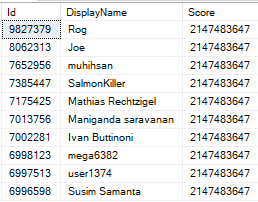
But now if I go into another window, this query will return wrong results.
    SELECT TOP 10 *
    FROM dbo.HighQuestionScores AS hqs WITH(NOLOCK)
    ORDER BY hqs.Id DESC;
BIGINT FOR U
In fact, any query that runs with a nolock hint will show incorrect values here.
Boss runs a report? Wrong.
Trigger fires based on a score change? Wrong.
User checks their account? Wrong.
Fully Correct
    SET TRANSACTION ISOLATION LEVEL SNAPSHOT;

    SELECT TOP 10 *
    FROM dbo.HighQuestionScores AS hqs
    ORDER BY hqs.Id DESC;
This query uses the snapshot isolation level.
It would do the same thing under read committed snapshot isolation, but without needing to set the isolation level.
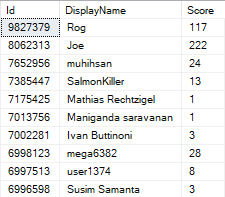
But now we don’t get someone’s accident in our query results.
Big Baby
Remember folks: yeah, blocking sucks, but incorrect data is usually way, way worse.
Thanks for reading!
Going Further
If this is the kind of SQL Server stuff you love learning about, you’ll love my training. Blog readers get 25% off the Everything Bundle — over 100 hours of performance tuning content. Need hands-on help? I offer consulting engagements from targeted investigations to ongoing retainers. Want a quick sanity check before committing to a full engagement? Schedule a call — no commitment required.
I know you don’t have bad queries. You’re smart people. But some people do!
Let’s also say that bad query is taking part in a modification.
UPDATE u2
SET u2.Reputation *= 2
FROM Users AS u
JOIN dbo.Users AS u2
ON CHARINDEX(u.DisplayName, u2.DisplayName) > 0
WHERE u2.Reputation >= 100000
AND u.Id <> u2.Id;
This query will run for so long that we’ll get sick of waiting for it. It’s really holding up writing this blog post.
Let’s try something a little different.
SELECT u.Id, u.DisplayName
INTO #Users
FROM dbo.Users AS u
WHERE u.Reputation >= 100000;

UPDATE u2
SET u2.Reputation *= 2
FROM #Users AS u
JOIN dbo.Users AS u2
ON CHARINDEX(u.DisplayName, u2.DisplayName) > 0
AND u.Id <> u2.Id;
This time, the query finishes in 43 seconds.
Plans and Events
The query plan looks like this:
You’re not cool.
Extended events can tell us when locks were taken and released to perform the update.
Ducked out
An exclusive lock was held on the table for over 35 seconds, so all but ~7 seconds of the plan has locks on the table we’re updating.
In real life, that’d probably mean a lot of blocking.
Alt Rock
Another way to handle this is to remove the long-running query from the update, and take advantage of the Primary Key/Clustered Index on the table.
First, isolate the rows we care about:
SELECT u2.Id, u2.Reputation * 2 AS DoubleRep
INTO #Updater
FROM #Users AS u
JOIN dbo.Users AS u2
ON CHARINDEX(u.DisplayName, u2.DisplayName) > 0
AND u.Id <> u2.Id;
Then do the update:
UPDATE u2
SET u2.Reputation = u.DoubleRep
FROM #Updater AS u
JOIN dbo.Users AS u2
ON u.Id = u2.Id;
This query only runs a few hundred milliseconds, so the locks taken are shorter.
Keep in mind, though, that the first insert query is still horrible.
It runs for ~40ish seconds, but at least we don’t lock any objects that other queries might care about.
Thanks for reading!
Going Further
If this is the kind of SQL Server stuff you love learning about, you’ll love my training. Blog readers get 25% off the Everything Bundle — over 100 hours of performance tuning content. Need hands-on help? I offer consulting engagements from targeted investigations to ongoing retainers. Want a quick sanity check before committing to a full engagement? Schedule a call — no commitment required.
I recently came across a bad locking problem. It was one of those things that happened “suddenly” and “for no reason”.
When I looked at the stored procedure, the code was something like this:
CREATE PROCEDURE dbo.bad_news(@PostTypeId INT)
AS
BEGIN

DECLARE @PTID INT
SELECT @PTID = CASE WHEN @PostTypeId < 1
                         OR @PostTypeId > 8
				    THEN 4
			   END
UPDATE p
SET p.Score += 1
FROM dbo.Posts AS p
WHERE p.PostTypeId = @PTID;

END
I mean, it would look like that if we were using Stack Overflow.
We weren’t, but I’ll leave the rest to your imagination.
Outside The Proc
We have this index:
CREATE INDEX ix_spanky ON dbo.Posts(PostTypeId);
Let’s run this code, and look at what happens.
BEGIN TRAN
UPDATE p
SET p.Score += 1
FROM dbo.Posts AS p
WHERE p.PostTypeId = 3;
ROLLBACK
We not only have exclusive locks on pages, but on the entire table now.
Overestimaters Anonymous
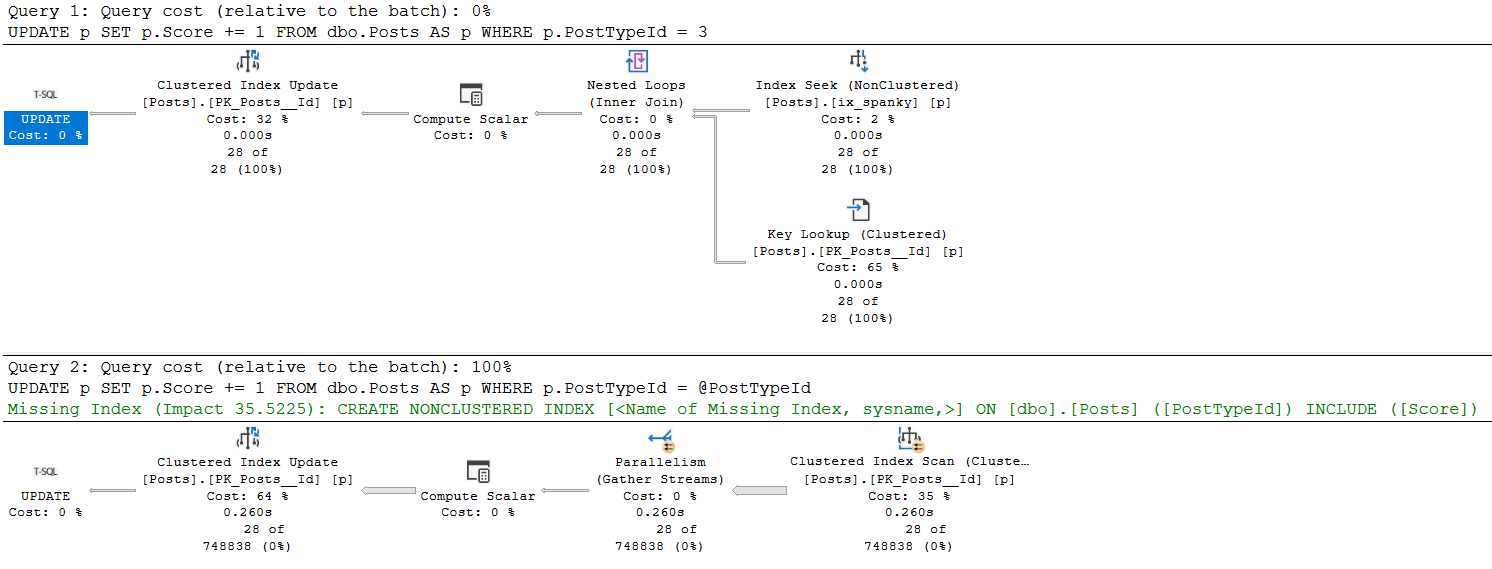
The execution plans for these two queries are much different.
umop
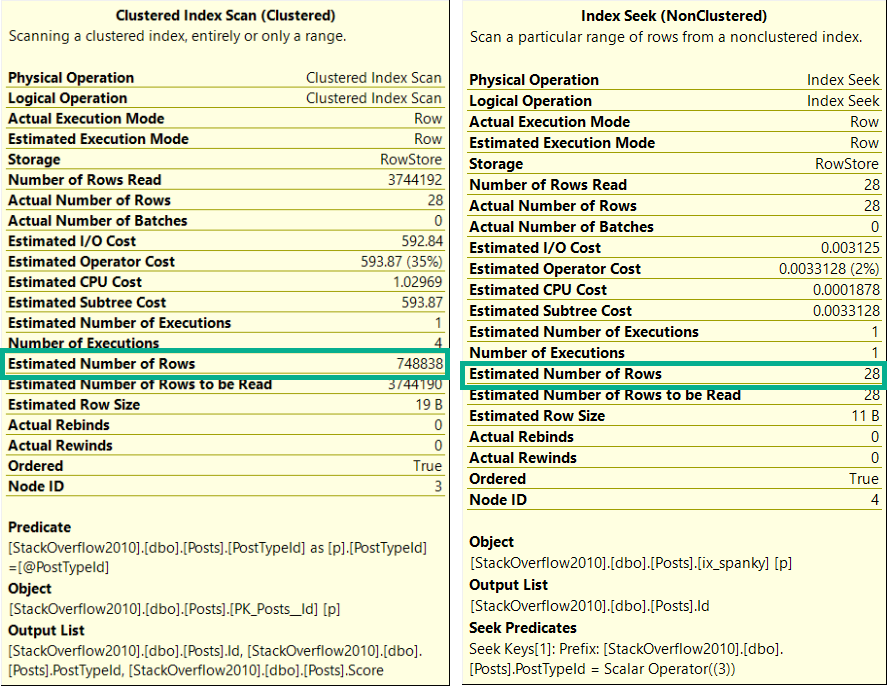
Likewise, the estimates are much different.
upside
Oh So Loco
This is a fairly well-documented outcome of using a “declared variable”, or the optimize for unknown hint.
The optimizer makes a usually-generally-bad guess at the number of rows it’ll have to deal with.
In this case, the stored procedure had been modified to account for bad values passed in from the application.
The outcome was severe blocking because modification queries were taking far more intrusive locks than necessary.
So, you know, don’t do that.
Thanks for reading!
Going Further
If this is the kind of SQL Server stuff you love learning about, you’ll love my training. Blog readers get 25% off the Everything Bundle — over 100 hours of performance tuning content. Need hands-on help? I offer consulting engagements from targeted investigations to ongoing retainers. Want a quick sanity check before committing to a full engagement? Schedule a call — no commitment required.
You want your stored procedure to be a unit of work that you can roll back if something goes awry.
At first, it’s a few quick operations.
But over the years, the code has gotten more complicated, data has gotten larger, and now you’ve got terrible blocking problems.
Do The Worm
Assuming you can’t get rid of the transaction, you need to think of it like a movie about interstellar travel.
You know the kind where someone folds a piece of paper in half and pokes a hole through it?
Your job is to make all the stuff that happens inside as fast as possible.
This won’t fix the blocking, but it will shorten it.
Other Approaches
It might be possible for you to get rid of the transaction if you can store the before and after data somewhere.
This will get rid of the transaction, so locks won’t be held for the duration of it, but it makes you do more work in the procedure.
For every row or set of rows you change, you have to get the current values, put them somewhere, and hang onto them.
If you need to roll back your work, you need to go through and put them back. This can cause all sorts of problems, especially if someone else is working on the same data at the same time. Who should win?
You can partially solve this with sp_getapplock, but then you’re locking access to code until the whole thing is done, and…
You’re back to having locking problems.
Another thing you might be able to implement if you can change table structure is add an “in use” bit column, and skip over rows that are in use by someone else. This is common in queue tables, but can be extended to other types of work tables.
Thanks for reading!
Going Further
If this is the kind of SQL Server stuff you love learning about, you’ll love my training. Blog readers get 25% off the Everything Bundle — over 100 hours of performance tuning content. Need hands-on help? I offer consulting engagements from targeted investigations to ongoing retainers. Want a quick sanity check before committing to a full engagement? Schedule a call — no commitment required.
There are all sorts of fun hints you can staple onto your queries that will make them behave differently.
Probably the most common one I see is the NOLOCK hint.
Don’t worry, this post has nothing to do with that.
You’ve been finger wagged to death about it already.
Other Lock Hints
Sometimes you want to try to control lock granularity. A noble effort, indeed.
To do that, you can use hints like ROWLOCK or PAGLOCK. They’ll let you tell the weevils inside your server to prefer those types of locks.
The thing is, both are still subject to lock escalation (unless you turn that off, too).
If we take an update query like this, and use sp_WhoIsActive to look at the locks:
    BEGIN TRAN;
    WITH x AS
    (
        SELECT TOP (5000)
                h.Score
        FROM dbo.HighQuestionScores AS h
        ORDER BY h.Id
    )
    UPDATE x
    SET  x.Score = 2147483647
    FROM x WITH (ROWLOCK);

    ROLLBACK
The only lock type that has an X type is the Key lock. The page and object lock types are only intent exclusive. You can read more about intent locks here.
Now, if we change the 5000 to 7000, we get much different results from sp_WhoIsActive.
We’ve hit lock escalation, and our precious ROWLOCK hint has been disregarded.
Funny, huh?
Thanks for reading!
Going Further
If this is the kind of SQL Server stuff you love learning about, you’ll love my training. Blog readers get 25% off the Everything Bundle — over 100 hours of performance tuning content. Need hands-on help? I offer consulting engagements from targeted investigations to ongoing retainers. Want a quick sanity check before committing to a full engagement? Schedule a call — no commitment required.
While working with a client who has a nasty blocking problem involving triggers, we were talking about using Snapshot Isolation to help fix the issue.
The thing is, there’s more than just stored procedures causing problems. Some of the issue is with triggers.
The prospect of having to modify a bunch of objects was a rightfully frightful one.
Funboy & Funboy & Funboy
In my database, I have Snapshot Isolation enabled.
I have a table with a trigger on it. The trigger doesn’t do anything except show me what my session’s isolation level is
CREATE TABLE dbo.t ( id INT NULL, dimdate DATETIME NULL );
CREATE TRIGGER dbo.dim_trigger
ON dbo.t
AFTER INSERT
AS
    BEGIN
        SET NOCOUNT ON;

        DECLARE @UserOptions TABLE ( SetOption VARCHAR(100), Value VARCHAR(100));
        DECLARE @IsolationLevel VARCHAR(100);

        INSERT @UserOptions
        EXEC ( 'DBCC USEROPTIONS WITH NO_INFOMSGS' );

        SELECT @IsolationLevel = 'Trigger:' + Value
        FROM   @UserOptions
        WHERE  SetOption = 'isolation level';

        PRINT @IsolationLevel;

    END;
I also have a stored procedure that checks the isolation level, and inserts into my table so that the trigger fires off.
CREATE OR ALTER PROCEDURE dbo.insert_t
AS
    BEGIN
        SET NOCOUNT ON;

        SET TRANSACTION ISOLATION LEVEL SNAPSHOT;

        DECLARE @UserOptions TABLE ( SetOption VARCHAR(100), Value VARCHAR(100));
        DECLARE @IsolationLevel VARCHAR(100);

        INSERT @UserOptions
        EXEC ( 'DBCC USEROPTIONS WITH NO_INFOMSGS' );

        SELECT @IsolationLevel = 'Procedure:' + Value
        FROM   @UserOptions
        WHERE  SetOption = 'isolation level';

        PRINT @IsolationLevel;

        INSERT dbo.t ( id, dimdate )
        VALUES ( 0, GETDATE());

    END;
On Notice
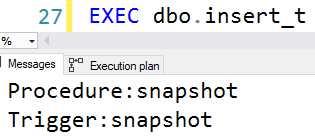
I’m only setting the isolation level in the stored procedure here.
When I run it, both will return the same isolation level no matter what you set it to.
Consistency
Thanks to Scott Ivey, whose code I borrowed for this.
And thank you for reading!
Going Further
If this is the kind of SQL Server stuff you love learning about, you’ll love my training. Blog readers get 25% off the Everything Bundle — over 100 hours of performance tuning content. Need hands-on help? I offer consulting engagements from targeted investigations to ongoing retainers. Want a quick sanity check before committing to a full engagement? Schedule a call — no commitment required.
Most scripts (even ones I’ve worked on!) that look at the plan cache, have had the ability to sort it by different metrics: CPU, reads, writes, duration, etc.
A lot of people are very interested in long running queries — and I am too!
Heck, they’re how I make money. Blogging pays like crap.
But there’s a slight problem with only looking at query duration.
Fake Locks
Let’s say I have a stored procedure that looks like this:
CREATE OR ALTER PROCEDURE dbo.dblock (@id INT)
AS
BEGIN
    BEGIN TRAN
        UPDATE u
        SET u.Reputation = 2147483647
        FROM dbo.Users AS u
        WHERE u.Id = @id

        WAITFOR DELAY '00:00:07.000'
    ROLLBACK
END;
GO
It’s there to simulate a long running modification query. You know, the kind of thing that’ll lead to blocking.
The kind of blocking that can make other queries feel like they take a long time.
Street Team
Here’s another stored procedure:
CREATE OR ALTER PROCEDURE dbo.the_lox (@id INT)
AS
BEGIN
    SELECT u.Id
    FROM dbo.Users AS u
    WHERE u.Id = @id
END;
GO
This will finish instantly. The Id column of the Users table is the Primary Key, as well as the Clustered Index.
There is literally nothing to tune here.
But it may look like it, sometimes…
D’evils
If I run these in different windows, the lox will be blocked by dblock.
--One Window
EXEC dbo.dblock @id = 22656;
GO

--Other window
EXEC dbo.the_lox @id = 22656;
GO
If you were wondering why I had a 7 second wait, it’s because it generally takes me two seconds to flip windows and run a query.
When the situation resolves, this is what the metrics look like:
SELECT OBJECT_NAME(deps.object_id) AS stored_procedure_name,
       ( deps.last_worker_time / 1000. ) AS cpu_time,
       ( deps.last_elapsed_time / 1000. ) AS run_time
FROM   sys.dm_exec_procedure_stats AS deps
WHERE  deps.object_id = OBJECT_ID('dbo.the_lox');
GO
Everything You Got
The query barely used any CPU, but it ran for 5 seconds.
If you order your plan cache by elapsed time, you might see blameless queries up at the top.
There are a lot of reasons why they could end up there, and blocking is one of them.
Unfortunately, there’s currently nothing to tell you why. If you’re just getting started with query tuning, this could look befuddling.
Are Averages Better?
Sometimes it helps to look at what runs for a long time on average — you can figure that out by looking at the number of executions.
That can make better sense of things, but not if a query has only run once, or if it gets blocked a lot.
It may make more sense to factor in metrics that represent physical work, like CPU, reads, or writes, rather than just relying purely on wall clock time.
Thanks for reading!
Going Further
If this is the kind of SQL Server stuff you love learning about, you’ll love my training. Blog readers get 25% off the Everything Bundle — over 100 hours of performance tuning content. Need hands-on help? I offer consulting engagements from targeted investigations to ongoing retainers. Want a quick sanity check before committing to a full engagement? Schedule a call — no commitment required.
Sometimes, you only wanna work on one thing. Other times, you only wanna work on something if it’s not locked by something else.
Locking hints can be really handy in these situations, especially the READPAST hint. The documentation for it says that it allows you to skip over row level locks (that means you can’t skip over page or object level locks).
What it leaves out is that your READPAST query may also need to try to take row level shared locks.
Here’s an example!
Sterling Reputation
If I run this query, it’ll take out locks we don’t want (without an index on Reputation).
BEGIN TRAN
UPDATE u
SET u.Reputation += 1
FROM dbo.Users AS u
WHERE u.Reputation = 1047863;

ROLLBACK
If we use sp_WhoIsActive @get_locks = 1; we’ll get this back:
But the addition of the index makes row level locks a more obvious choice for both queries.
Thanks for reading!
Going Further
If this is the kind of SQL Server stuff you love learning about, you’ll love my training. Blog readers get 25% off the Everything Bundle — over 100 hours of performance tuning content. Need hands-on help? I offer consulting engagements from targeted investigations to ongoing retainers. Want a quick sanity check before committing to a full engagement? Schedule a call — no commitment required.
In this video, I dive into a fascinating SQL Server feature called SP Get App Lock, which allows for session-level locking on imaginary resources rather than physical objects like tables or indexes. This can be particularly useful for serializing access to specific sections of code without blocking other operations on the database. By using this method, I demonstrate how two stored procedures can run concurrently but still ensure that only one can modify a shared resource at any given time, thanks to an exclusive lock on an imaginary resource named “Locko.” This example showcases how SP Get App Lock can enhance overall system concurrency and provide a flexible way to manage access in complex applications.
Full Transcript
Howdy folks, Erik Darling here with Erik Darling Data. And I just realized that my VM is slightly off kilter, so I’m going to fix that before I continue recording. There we go. Yeah, I think that’s better. Alright, yeah, now that’s all framed up. Cool. Anyway, hopefully the rest of the video will be flawless. So this video is sponsored by a red pen. Thank you, red pen. What I want to talk about today… Oh, it’s also sponsored by this pair of scissors. Thank you, scissors. What I want to talk to you about today is something kind of neat that I’ve been messing with. And it’s been around for a while. It’s not even anything remotely new. But it’s called SP Get App Lock. And it’s a system store procedure that allows you to take a lock on kind of like an imaginary resource so that you can serialize access to that resource. Now, I know that a lot of people, when they think about like locking and serializing access, they might think about table locks, right? Like not table locks, but like locking a table or locking an index in some way. Or like doing a begin train and locking something that way. This is similar, but different because you’re not locking like a table or index.
or anything else weird. You’re just saying, I don’t want anything else to be able to use this section of code while I’m using it. So I’ve had a store procedure on this window. This is called SP App Lock 1. And what SP App Lock 1 does is since I asked on Twitter and everyone seemed hip to exact abort, I’m turning that on. And what this does is it… Oh, let me knock this out so it’s a little bit easier to read. So what this does is it calls SP Get App Lock and it locks a resource that I called Locko. Locko is not a table, not an index, not a view, not a thing. It’s just an imaginary resource. I’m taking a session level lock and the lock mode that I’m taking is exclusive. Now, I could take an exclusive or an update lock here in order to serialize access to that lock, to that imaginary resource. So I’m just doing exclusive because I don’t know. I’m feeling exclusive this evening.
And after I take this lock, I’m going to update a table called LockMe. And I’m going to set an ID column equal to 2. Then I’m going to wait for 10 seconds and then I’m going to release the lock. Over in this window, I am doing nearly the same thing.
SP App Lock 2 will run. It will… I don’t know why that’s red. That’s weird. Anyway. SP App Lock will run. Use Get App Lock. Try to take a lock on Locko at the session level. Again, an exclusive lock. And this one’s going to set the ID in the LockMe table to 3 rather than 2.
Then this one is going to wait for 10 seconds and then it’s going to release the lock. This one also releases the lock at the end. I forgot if I mentioned that or not. Anyway, these are already created. So I’m going to get rid of this and get rid of this.
And then I’m going to show you a little bit more setup. So I have a table called LockMe. And LockMe has nothing to do with LockO. LockMe is just a table that both of those door procedures are going to try to update.
Right now, I have the ID 1 in that table. Just the ID 1. I’m not playing any tricks with isolation levels here. The isolation level for this session that I’m running everything in is Read Committed.
You can see that right down here. My isolation level is Read Committed. I’m not using No Lock. I’m not using Read Uncommitted. I’m not doing anything crazy like that.
What I want to show you is two things. One, that you can use this to take locks on a section of code rather than on physical objects in the database. And what kind of locks that takes.
And how that can help you improve overall system concurrency. So I have to do this pretty quickly. I’m going to run sp.getAppLock1. Run get2.
And then I’m going to come over here. And I’m going to run sp.whoisActive. And a select. The select query now returns ID 2. Because that first door procedure set the ID to 2.
ID was 1 before. Now it’s 2. So the first thing we see here is that that table got updated. The update finished and it wasn’t locked.
Where it’s interesting is when we look at sp.whoisActive. And we have the wait4 from the first door procedure. And we have this other query called xpUserLock.
sp.getAppLock is a wrapper for xpUserLock. If we look at the wait info for those two columns, we can see that we’re about 4.5 seconds into the wait4.
Remember, there’s a 10-second wait4 in both store procedures. That’s the one from the first one running. And the second store procedure is waiting on an exclusive lock. But the exclusive lock that it’s waiting on is not on the table.
The exclusive lock that we’ve granted to the first store procedure is on locko. And locko is not a real thing. It’s imaginary.
But we’ve locked it so that nothing else can get in and run. This thing has taken an exclusive lock and it’s been granted. All right? You can see that right there.
Pretty cool. If we look at the lockXML for the query that’s waiting, in other words, the xpUserLock query that’s waiting, and we go down here, we can see that this one is attempting to lock locko.
Locko is just trying to take an exclusive lock on this. We can see the exclusive request mode, but this one is being…
Oops. Try that again. This one is being forced to wait. So we have waiting to get an exclusive lock. In other words, what we’ve done is we’ve run a store procedure, completed a modification to the table.
So that table is no longer locked. We were able to select ID2 from the lock. And then we ran another store procedure that wanted to do almost the same thing.
But it wasn’t waiting on the lock on that object. It was waiting on a lock on our imaginary locko resource. If we come back to this window, now that nothing’s running, these both finished, and we run this, and we select from lock me, now we’re going to get ID3 back.
So eventually, this second store procedure that was looking to set ID to 3 did run, and it did release everything. I could go back and forth showing you that this would happen in a different order in the same way if I did it with SP App Lock, if I executed SP App Lock 2 first and then SP App Lock 1, if I change the lock mode to update and all this other stuff.
I would encourage you to go read a bit of the documentation about SP App Lock to learn more. Anyway, that is about all the time I have before I go to bed because it’s late.
but I wanted to get this recorded just in case an asteroid hits tonight or something. Again, this video was sponsored by a red pen and a pair of scissors.
So thank you to our generous sponsors. Anyway, I hope you learned something. I hope you enjoyed the video and I will see you next time or whatever unless an asteroid hits. I hope you enjoyed it.
Going Further
If this is the kind of SQL Server stuff you love learning about, you’ll love my training. Blog readers get 25% off the Everything Bundle — over 100 hours of performance tuning content. Need hands-on help? I offer consulting engagements from targeted investigations to ongoing retainers. Want a quick sanity check before committing to a full engagement? Schedule a call — no commitment required.