If this is the kind of SQL Server stuff you love learning about, you’ll love my training. Blog readers get 25% off the Everything Bundle — over 100 hours of performance tuning content. Need hands-on help? I offer consulting engagements from targeted investigations to ongoing retainers. Want a quick sanity check before committing to a full engagement? Schedule a call — no commitment required.
In SQL Server, troubleshooting blocking problems is a pain. It’s one of those things you really have to be monitoring for pretty actively in order to catch the full extent of it.
You might catch glimpses of it in sp_WhoIsActive or sp_BlitzWho, but it’s really hard to get the full picture and blocking chain for the duration of the event.
This is much easier done via dedicated monitoring tools, where the GUI will often give you a tree view of the blocking.
These are generally more helpful to identify which queries were being blocked, but still not who was doing the blocking.
Regular wait stats (i.e. from sys.dm_os_wait_stats) have no association to the queries that caused them.
If you’re on SQL Server 2017 or better, and you’re using Query Store, you can get a look at those waits with a query like this:
SELECT   qsws.wait_category_desc,
         SUM(qsws.total_query_wait_time_ms) / 1000. AS total_query_wait_time_s,
         AVG(qsws.avg_query_wait_time_ms) / 1000. AS avg_query_wait_time_s,
         MAX(qsws.max_query_wait_time_ms) / 1000. AS max_query_wait_time_s
FROM     sys.query_store_wait_stats AS qsws
GROUP BY qsws.wait_category_desc
ORDER BY total_query_wait_time_s DESC;
The view of your wait stats is far less detailed, but at least it’s only this one database. Look, at least you get that.
With that out of the way, let’s take that simple query and make a couple minor adjustments to get some other information out.
WITH qs_waits AS (
SELECT   qsws.wait_category_desc,
         qsws.plan_id,
         SUM(qsws.total_query_wait_time_ms) / 1000. AS total_query_wait_time_s,
         AVG(qsws.avg_query_wait_time_ms) / 1000. AS avg_query_wait_time_s,
         MAX(qsws.max_query_wait_time_ms) / 1000. AS max_query_wait_time_s
FROM     sys.query_store_wait_stats AS qsws
WHERE qsws.wait_category_desc = 'Lock'
GROUP BY qsws.wait_category_desc, qsws.plan_id
)
SELECT qsw.*,
       r.*,
       p.query_sql_text,
       TRY_CONVERT(XML, p.query_plan) AS query_plan
FROM qs_waits AS qsw
OUTER APPLY
(
    SELECT TOP (1) qsp.plan_id,
                   qsp.query_plan,
                   qsqt.query_sql_text
    FROM sys.query_store_plan AS qsp
    JOIN sys.query_store_query AS qsq
        ON qsq.query_id = qsp.query_id
    JOIN sys.query_store_query_text AS qsqt
        ON qsq.query_text_id = qsqt.query_text_id
    WHERE qsw.plan_id = qsp.plan_id
    ORDER BY qsp.last_execution_time DESC
) AS p
OUTER APPLY
(
    SELECT TOP (1) qsrs.avg_duration / 1000. AS avg_duration,
                   qsrs.avg_cpu_time / 1000. AS avg_cpu_time
    FROM sys.query_store_runtime_stats AS qsrs
    WHERE qsrs.plan_id = p.plan_id
    ORDER BY qsrs.last_execution_time DESC
) AS r;
There we go.
Nice, clean, simple, but most important totally intuitive. I love how easy it is to quickly get the information you want.
?
Lookin’ For Locks
That query will get information about queries which waited on Locks — that’s why we’re getting plan_id up in our CTE.
After that, we’re getting the plan and text of any queries that waited on locks, and a couple vanity metrics.
Growing Away
Only one query waited on locks. Make a couple notes here, though:
avg_query_wait_time is 21 seconds
avg_query_duration is 21 seconds
avg_cpu_time is 0.12 seconds
My workload is Highly Contrived™ so the avg wait and query duration line up. In real life, you probably won’t have queries that were only ever waiting on locks to be released.
But it’s worth making some comparisons like this when you’re having blocking problems, especially when you tie wait times and durations in with cpu time.
If cpu is very low but duration is high, generally, you’ve found blocked queries.
Collectiving
Looking at the text and plan, we can also reasonably surmise that this read query wasn’t blocking anything.
But Still…
This doesn’t tell us what query was blocking the select. If you want to figure that out, you’ve got some options:
Sure, you could also go digging through DMVs to find modification queries that last ran around the same time, but I’ve hit a lot of dead ends there.
A lot of this pain would go away if SQL Server were optimistic by default, or if you’re allowed to enable an optimistic isolation level.
And remember: Queries taking locks don’t register locking waits. Only queries being blocked register locking waits.
Thanks for reading!
Going Further
If this is the kind of SQL Server stuff you love learning about, you’ll love my training. Blog readers get 25% off the Everything Bundle — over 100 hours of performance tuning content. Need hands-on help? I offer consulting engagements from targeted investigations to ongoing retainers. Want a quick sanity check before committing to a full engagement? Schedule a call — no commitment required.
Yes, indexed view maintenance can be quite rough. I don’t mean like, rebuilding them. I will never talk about that.
I mean that, in some cases locks are serializable, and that if you don’t mind your indexes you may find run-of-the-mill modifications taking quite a long time.
Let’s go look!
Mill Town
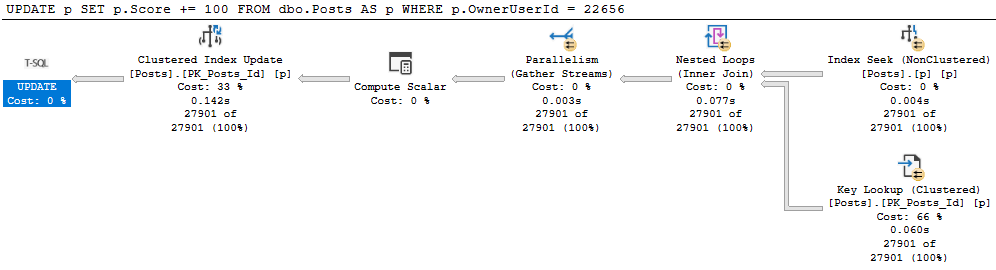
Let’s get update a small chunk of the Posts table.
BEGIN TRAN
UPDATE p
SET p.Score += 100
FROM dbo.Posts AS p
WHERE p.OwnerUserId = 22656;
ROLLBACK
Let’s all digress from the main point of this post for a moment!
It’s generally useful to give modifications an easy path to find data they need to update. For example:
Uh no
This update takes 1.6 seconds because we have no useful index on OwnerUserId. But we get a daft missing index request, because it wants to include Score, which would mean we’d need to then update that index as well as read from it. Locking leads to NOLOCK hints. I tend to want to introduce as little of it as possible.
With an index on just OwnerUserId, our situation improves dramatically.
100000X IMPROVEMENT
Allow Me To Reintroduce Myself
Let’s see what happens to our update with an indexed view in place.
CREATE OR ALTER VIEW dbo.PostScoresVotes
WITH SCHEMABINDING
AS
SELECT   p.Id,
         SUM(p.Score * 1.0) AS ScoreSum,
		 COUNT_BIG(v.Id) AS VoteCount,
		 COUNT_BIG(*) AS OkayThen
FROM     dbo.Posts AS p
JOIN     dbo.Votes AS v
    ON p.Id = v.PostId
WHERE p.PostTypeId = 2
AND   p.CommunityOwnedDate IS NULL
GROUP BY p.Id;
GO

CREATE UNIQUE CLUSTERED INDEX c_Id
    ON dbo.PostScoresVotes(Id);
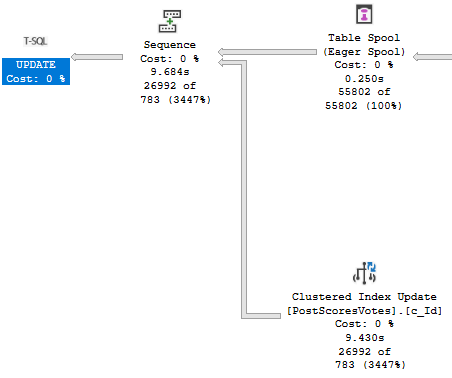
Our update query now takes about 10 seconds…
Oof dawg
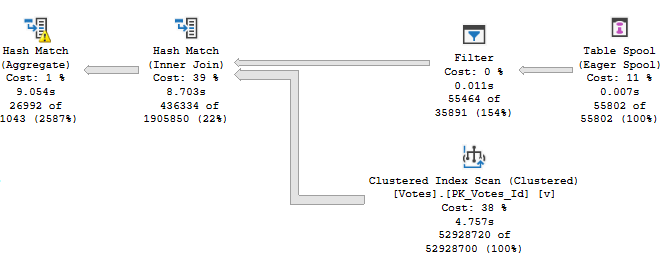
With the majority of the time being spent assembling the indexed view for maintenance.
Yikes dawg
The Problem Of Course
Is that our indexes are bad. We’ve got no helpful index between Posts and Votes to help with the assembly.
Our first clue may have been when creating the indexed view took a long time, but hey.
Let’s fix it.
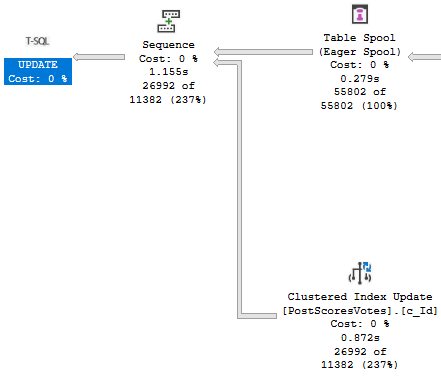
CREATE INDEX v ON dbo.Votes(PostId);
Now our update finishes in about a second!
Cleant Up
Thanks for reading!
Going Further
If this is the kind of SQL Server stuff you love learning about, you’ll love my training. Blog readers get 25% off the Everything Bundle — over 100 hours of performance tuning content. Need hands-on help? I offer consulting engagements from targeted investigations to ongoing retainers. Want a quick sanity check before committing to a full engagement? Schedule a call — no commitment required.
If this is the kind of SQL Server stuff you love learning about, you’ll love my training. Blog readers get 25% off the Everything Bundle — over 100 hours of performance tuning content. Need hands-on help? I offer consulting engagements from targeted investigations to ongoing retainers. Want a quick sanity check before committing to a full engagement? Schedule a call — no commitment required.
I’ll sometimes see people implement retry logic to catch deadlocks, which isn’t a terrible idea by itself. The problem that may arise is when the deadlock monitor takes a full 5 seconds to catch a query, which can block other queries, and may generally make things feel slower.
Different Locks
An alternative is to set a lock timeout that’s shorter than five seconds.
DECLARE @lock_try INT = 0

WHILE @lock_try < 5
BEGIN
    BEGIN TRY

        SET LOCK_TIMEOUT 5; /*five milliseconds*/

        SELECT COUNT(*) AS records FROM dbo.Users AS u;

    END TRY
    BEGIN CATCH

        IF ERROR_NUMBER() <> 1222 /*Lock request time out period exceeded.*/
		RETURN;

    END CATCH;

SET @lock_try += 1;

WAITFOR DELAY '00:00:01.000' /*Wait a second and try again*/

END;
While 5 milliseconds is maybe an unreasonably short time to wait for a lock, I’d rather you start low and go high if you’re trying this at home. The catch block is set up to break if we hit an error other than 1222, which is what gets thrown when a lock request times out.
This is a better pattern than just hitting a deadlock, or just waiting for a deadlock to retry. Normally when a deadlock occurs, one query throws an error, and there’s no attempt to try it again (unless a user is sitting there hitting submit until something works). Waiting ~5 seconds (I know I’m simplifying here, and the deadlock monitor will wake up more frequently after it detects one)
The big question is: are you better off doing this in T-SQL than in your application?
Thanks for reading!
Going Further
If this is the kind of SQL Server stuff you love learning about, you’ll love my training. Blog readers get 25% off the Everything Bundle — over 100 hours of performance tuning content. Need hands-on help? I offer consulting engagements from targeted investigations to ongoing retainers. Want a quick sanity check before committing to a full engagement? Schedule a call — no commitment required.
I seem to have gotten quite a few questions about this lately, so I’m going to write down some thoughts here.
It’s probably crappy form for a blog post, but what the heck.
Queries Decide The Isolation Level
They can choose anything from read uncommitted to serializable. Read uncommitted is the more honest term for what’s going on. When people see the “nolock” hint, they often assume that means their query won’t take any locks. What it really means is that it will ignore locks taken by other queries. The more accurate term would be “norespect”. This is probably what leads to confusion: reading uncommitted data sounds different than not locking data. But they’re both the same.
The Storage Engine Decides Which Locks Are Used
And if lock escalation is attempted. The storage engine will respect the query’s isolation level, and any table-level settings related to lock granularity, like not allowing row or page locks. It may not fully respect any query level hints regarding lock granularity.
One thing that helps reduce the chance of lock escalation is having a good index to help your modification query find rows. Though if you need to find a million rows, don’t expect SQL Server to happily take a million row locks, just because of an index.
Batching modifications is one way to avoid lock escalation when you need to modify a lot of rows, though it isn’t always possible to do this. If for some reason you need to roll the entire change back, you’d have to keep track of all the committed batches somewhere, or wrap the entire thing in a transaction (which would defeat the purpose, largely).
One thing that increases the chance of lock escalation is having many indexes present on a table. For inserts and deletes, all of those indexes will get touched (unless they’re filtered around the rows to be inserted or deleted. For updates, any indexes containing the column(s) to be modified will need to be touched (again, barring filtering around the updated portion). Lock counts are cumulative across objects.
Not All “Blocking” Is “Locking”
In other words, when you see queries being blocked, there may not be an LCK wait involved. Some “blocking” can happen with resource contention, whether it’s physical (CPU, memory, disk), logical (like if there’s latch or spinlock contention), or even programmatic (if you’re lucky enough to see the source code).
This can happen in tempdb if you’re creating a lot of objects rapid-fire, even if you’re using table variables. Table variables can avoid some of the overhead that temp tables incur under high frequency execution, but not all of it.
Thanks for reading!
Going Further
If this is the kind of SQL Server stuff you love learning about, you’ll love my training. Blog readers get 25% off the Everything Bundle — over 100 hours of performance tuning content. Need hands-on help? I offer consulting engagements from targeted investigations to ongoing retainers. Want a quick sanity check before committing to a full engagement? Schedule a call — no commitment required.
Today we’re going to look at how unused indexes add to locking problems.
Hold My Liquor
Video Summary
In this video, I delve into the impact of unused indexes on lock escalation in SQL Server. Starting off with a real-world scenario where I demonstrate how these unused indexes can significantly affect query performance by altering lock behavior, I walk you through an example update query and show how adding even seemingly helpful indexes can lead to excessive locking. By experimenting with various indexes and observing the resulting lock patterns, I aim to illustrate that having numerous indexes on frequently modified data can accelerate lock escalation, potentially causing more blocking issues. This video is a continuation of my exploration into unused indexes and their hidden costs, encouraging viewers to think critically about index quality rather than just quantity.
Full Transcript
Ehhhhh. It’s 8.30 in the morning and I’m recording this because I have a call in like an hour and I have some stuff that I got to do before that. I was going to record it last night but I got sleepy. Anyway, we’re going to talk about how unused indexes. Now, yesterday’s post was about how unused indexes could mess up the buffer pool, how they get going there when queries read them to put writes on them, right? To modify them. So here we’re going to talk about how that can change lock escalation. Now, the, like I’m not going to set up a weird workload to like say, hey, look at these indexes are so unused, blah, blah, blah. I don’t want you to think about these as just being like extra indexes. I want you to think about these being unused indexes. These are low quality indexes. They’re not like just extra. They’re not just like hanging around, but not like we had a certain number of indexes. You can’t have more than that because it’s just going to ruin your life. I just want you to think of it as a context. Like you ran SP Blitz index or something. You saw like unused indexes or you saw like indexes with a high right to read ratio against them and you want to know like what problems they might cause. There are a bunch of them. We talked about the buffer pool yesterday when we have to maintain these indexes when they’re written to and today we’re going to look at how they affect lock escalation. Now, the update query that I’m going to run is over in this window.
It updates everyone’s age where the user reputation equals 191 and of course I chose that number for a very specific reason. Now, let’s make sure that we don’t have any indexes going on here and we don’t. And I just want to show you really quickly that when we run this with no index on the table, we update 1500 rows. And when we look at the request mode, we have locked exclusively some pages. We have only asked for an intent exclusive lock on the object. The thing is without a helpful index to help us find user IDs with this reputation.
Let’s put that down a little bit. Without a helpful index to help us find user IDs of this reputation. This query just takes like excessive little of this where we’ll take like an object level lock pretty quickly. Right now. So, if we run this query, we can get one. And if we get this run this query, we can’t this this query is effectively blocked because this person has a reputation of 191, which is a record that we’re updating. So, let’s kill that and let’s roll this back and let’s add a helpful index and look how locking changes. So, that index is now in place. We’ll run our update.
And now let’s look at what we have locked. And now we only have intent exclusive locks on pages. We only have an intent exclusive lock on the object. And now we have exclusive locks on the key of an index. That index is the index we have the locks on is the one that we just created over here on the reputation column. So, we would still be able to select this data, but we wouldn’t be able to select this data because this data would still be locked.
Cool. Now, let’s roll this back and let’s see at what point of adding indexes does SQL Server say, well, I’m just going to lock the entire table. So, we’re going to add this index. And the point of all these indexes is that they all have the age column in them somewhere. So, that means that we’re going to have to modify them. Right? If they didn’t have the age column in them, we wouldn’t have to touch them.
But since these all have the age column in them and we’re updating age, well, that’s just a break. So, we added that index. Let’s go over here and look at this. Still 1500 rows. And when we run this, now we just have more locks on more keys. Okay? We went up from 1500 to 3100 something. Right? We effectively doubled the amount of locks.
So, now, go back and we’ll add our next index. What will happen now? Where will this go? We’ll do begin trend. Update that. Come back over here and look. Now, we just have more total locks over here. We still only have intent exclusive locks down here.
We only have the exclusive, like, I’ll mess with you locks up here. Fine. Roll this back. All right. Now, we’re going to add a full one, two, three, fourth, fourth index to the table. And when that’s in place, we’ll go look and see what happens. We’ll come run our update over here. We can trend 1556. What happens now? Well, 9000 locks up here. That’s getting up there, right?
And everything you heard about lock escalation is weird. All right. Let’s add another index to the mix. Let’s go get this one on there. And it was funny when I was practicing writing this, the amount of times I forgot to roll this back before trying to create an index. It was terrible. It was very unprofessional. And there was a lot of just terrible blocking involved.
So let’s go and run this now. And now we have, well, still attended the, but, but, but, but. And now we just have 10,000, almost 11,000 key locks. Ooh, boy, SQL Server. What are you up to? I’m being quite devilish, quite devilish this morning. It was being quite devilish last night too, if I do say so myself. That’s SQL Server. All right.
So now we’re going to go run this update again with a yet another index on the table and we’ll run this and 14,000 key locks, one exclusive lock. All right. Only on key intent, intent, funny, right? Funny stuff. All right. Roll you back. Messed everything up. Messed the whole thing up. Now let’s add one more index.
Let’s see what we add when we add this one to the pile. What happens? Begin turn, run that, see what kind of locks we have. And finally, we have an exclusive lock on the object. So now we have a full table lock, which means that if we wanted to run this count query, we couldn’t.
This query is now blocked. So the bottom line on what I was trying to, what I’m trying to get to you, get, get across to you here, is that when you have a lot of indexes on a table, you typically increase lock escalation when you need to modify data. Now, this is assuming that, you know, you have indexes on data that is frequently modified.
This can be very frequent for, you know, of course, inserts because inserts, you know, they just kind of write to wherever. Single row inserts, probably not, probably not as bad, but, you know, probably take quite a bit of that. But, you know, when you update data or when you delete data with a where clause, depending on how much data you’re deleting, you may see lock escalation occur much faster when you have more indexes on the table and you’re taking more locks.
Because the locks are, like, cumulative, right? So you may see lock escalation happen faster when you have more indexes. Now, there’s all sorts of ways to remedy this, right?
There’s all sorts of ways to get around, like, the terrible reader-on-writer locking that we were just looking at, you know, there’s optimistic isolation levels. There’s, of course, the fabulous, wonderful no-lock hint that I see everyone use so successfully and so happily. I’m kidding.
It’s a miserable experience for everybody. Anyway, that’s it for me. I’m going to go finish my coffee and, I don’t know, I’ll probably be embarrassed by how incoherent I was on this later. Anyway, thanks for watching.
I hope you learned something. I hope you liked the video. Maybe? Maybe? I don’t know. Maybe you did. Maybe you didn’t. Anyway, I’m Eric with Erik Darling Data. I’m actually Erik Darling, too, so if that counts.
Anyway, thank you for watching and I will see you in another video at another time. Maybe I’ll wear a cowboy hat in the video. It doesn’t exactly look like a cowboy hat.
Before I get my jacket, I perhaps Hong Haut, who will get on Tuesday? I certainly don’t know. I’m here waiting. Maybe I’m going to see one of my shoes. Sometimes I could walk a basketball over your shoes and do my shoes and do my shoes. Or there is a little惹 of a laundry thing from now, and then I will open any shoes. Maybe I can walk a covered aba or a cafeteria. Right, absolutely. Okay, sure.
Video Summary
In this video, I delve into the impact of unused indexes on lock escalation in SQL Server. Starting off with a real-world scenario where I demonstrate how these unused indexes can significantly affect query performance by altering lock behavior, I walk you through an example update query and show how adding even seemingly helpful indexes can lead to excessive locking. By experimenting with various indexes and observing the resulting lock patterns, I aim to illustrate that having numerous indexes on frequently modified data can accelerate lock escalation, potentially causing more blocking issues. This video is a continuation of my exploration into unused indexes and their hidden costs, encouraging viewers to think critically about index quality rather than just quantity.
Full Transcript
Ehhhhh. It’s 8.30 in the morning and I’m recording this because I have a call in like an hour and I have some stuff that I got to do before that. I was going to record it last night but I got sleepy. Anyway, we’re going to talk about how unused indexes. Now, yesterday’s post was about how unused indexes could mess up the buffer pool, how they get going there when queries read them to put writes on them, right? To modify them. So here we’re going to talk about how that can change lock escalation. Now, the, like I’m not going to set up a weird workload to like say, hey, look at these indexes are so unused, blah, blah, blah. I don’t want you to think about these as just being like extra indexes. I want you to think about these being unused indexes. These are low quality indexes. They’re not like just extra. They’re not just like hanging around, but not like we had a certain number of indexes. You can’t have more than that because it’s just going to ruin your life. I just want you to think of it as a context. Like you ran SP Blitz index or something. You saw like unused indexes or you saw like indexes with a high right to read ratio against them and you want to know like what problems they might cause. There are a bunch of them. We talked about the buffer pool yesterday when we have to maintain these indexes when they’re written to and today we’re going to look at how they affect lock escalation. Now, the update query that I’m going to run is over in this window.
It updates everyone’s age where the user reputation equals 191 and of course I chose that number for a very specific reason. Now, let’s make sure that we don’t have any indexes going on here and we don’t. And I just want to show you really quickly that when we run this with no index on the table, we update 1500 rows. And when we look at the request mode, we have locked exclusively some pages. We have only asked for an intent exclusive lock on the object. The thing is without a helpful index to help us find user IDs with this reputation.
Let’s put that down a little bit. Without a helpful index to help us find user IDs of this reputation. This query just takes like excessive little of this where we’ll take like an object level lock pretty quickly. Right now. So, if we run this query, we can get one. And if we get this run this query, we can’t this this query is effectively blocked because this person has a reputation of 191, which is a record that we’re updating. So, let’s kill that and let’s roll this back and let’s add a helpful index and look how locking changes. So, that index is now in place. We’ll run our update.
And now let’s look at what we have locked. And now we only have intent exclusive locks on pages. We only have an intent exclusive lock on the object. And now we have exclusive locks on the key of an index. That index is the index we have the locks on is the one that we just created over here on the reputation column. So, we would still be able to select this data, but we wouldn’t be able to select this data because this data would still be locked.
Cool. Now, let’s roll this back and let’s see at what point of adding indexes does SQL Server say, well, I’m just going to lock the entire table. So, we’re going to add this index. And the point of all these indexes is that they all have the age column in them somewhere. So, that means that we’re going to have to modify them. Right? If they didn’t have the age column in them, we wouldn’t have to touch them.
But since these all have the age column in them and we’re updating age, well, that’s just a break. So, we added that index. Let’s go over here and look at this. Still 1500 rows. And when we run this, now we just have more locks on more keys. Okay? We went up from 1500 to 3100 something. Right? We effectively doubled the amount of locks.
So, now, go back and we’ll add our next index. What will happen now? Where will this go? We’ll do begin trend. Update that. Come back over here and look. Now, we just have more total locks over here. We still only have intent exclusive locks down here.
We only have the exclusive, like, I’ll mess with you locks up here. Fine. Roll this back. All right. Now, we’re going to add a full one, two, three, fourth, fourth index to the table. And when that’s in place, we’ll go look and see what happens. We’ll come run our update over here. We can trend 1556. What happens now? Well, 9000 locks up here. That’s getting up there, right?
And everything you heard about lock escalation is weird. All right. Let’s add another index to the mix. Let’s go get this one on there. And it was funny when I was practicing writing this, the amount of times I forgot to roll this back before trying to create an index. It was terrible. It was very unprofessional. And there was a lot of just terrible blocking involved.
So let’s go and run this now. And now we have, well, still attended the, but, but, but, but. And now we just have 10,000, almost 11,000 key locks. Ooh, boy, SQL Server. What are you up to? I’m being quite devilish, quite devilish this morning. It was being quite devilish last night too, if I do say so myself. That’s SQL Server. All right.
So now we’re going to go run this update again with a yet another index on the table and we’ll run this and 14,000 key locks, one exclusive lock. All right. Only on key intent, intent, funny, right? Funny stuff. All right. Roll you back. Messed everything up. Messed the whole thing up. Now let’s add one more index.
Let’s see what we add when we add this one to the pile. What happens? Begin turn, run that, see what kind of locks we have. And finally, we have an exclusive lock on the object. So now we have a full table lock, which means that if we wanted to run this count query, we couldn’t.
This query is now blocked. So the bottom line on what I was trying to, what I’m trying to get to you, get, get across to you here, is that when you have a lot of indexes on a table, you typically increase lock escalation when you need to modify data. Now, this is assuming that, you know, you have indexes on data that is frequently modified.
This can be very frequent for, you know, of course, inserts because inserts, you know, they just kind of write to wherever. Single row inserts, probably not, probably not as bad, but, you know, probably take quite a bit of that. But, you know, when you update data or when you delete data with a where clause, depending on how much data you’re deleting, you may see lock escalation occur much faster when you have more indexes on the table and you’re taking more locks.
Because the locks are, like, cumulative, right? So you may see lock escalation happen faster when you have more indexes. Now, there’s all sorts of ways to remedy this, right?
There’s all sorts of ways to get around, like, the terrible reader-on-writer locking that we were just looking at, you know, there’s optimistic isolation levels. There’s, of course, the fabulous, wonderful no-lock hint that I see everyone use so successfully and so happily. I’m kidding.
It’s a miserable experience for everybody. Anyway, that’s it for me. I’m going to go finish my coffee and, I don’t know, I’ll probably be embarrassed by how incoherent I was on this later. Anyway, thanks for watching.
I hope you learned something. I hope you liked the video. Maybe? Maybe? I don’t know. Maybe you did. Maybe you didn’t. Anyway, I’m Eric with Erik Darling Data. I’m actually Erik Darling, too, so if that counts.
Anyway, thank you for watching and I will see you in another video at another time. Maybe I’ll wear a cowboy hat in the video. It doesn’t exactly look like a cowboy hat.
Before I get my jacket, I perhaps Hong Haut, who will get on Tuesday? I certainly don’t know. I’m here waiting. Maybe I’m going to see one of my shoes. Sometimes I could walk a basketball over your shoes and do my shoes and do my shoes. Or there is a little惹 of a laundry thing from now, and then I will open any shoes. Maybe I can walk a covered aba or a cafeteria. Right, absolutely. Okay, sure.
Going Further
If this is the kind of SQL Server stuff you love learning about, you’ll love my training. Blog readers get 25% off the Everything Bundle — over 100 hours of performance tuning content. Need hands-on help? I offer consulting engagements from targeted investigations to ongoing retainers. Want a quick sanity check before committing to a full engagement? Schedule a call — no commitment required.
Under most circumstances, this won’t happen. Most.
Shared locks taken by read queries will let go pretty quickly.
Under most circumstances.
Out, Liars
To hold onto Shared locks, you’d need to use an isolation level escalation hint, like REPEATABLE READ.
I could do that here if I were a lazy cheater.
Instead, I’m going to show you a more common and interesting scenario.
You see, like a lot of important specks of knowledge, this one comes from Craig Freedman:
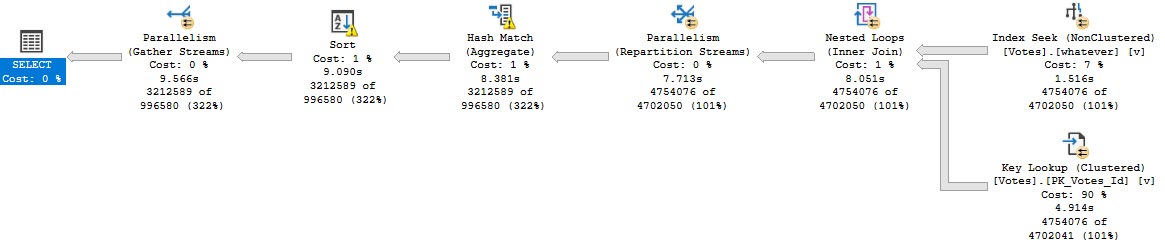
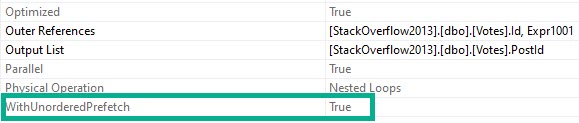
Note the “WITH UNORDERED PREFETCH” keywords on the nested loops join.
I am not going to demontrate it , but when SQL Server executes this query, it holds S locks on the rows returned by the index seek until the query finishes executing.
I’m going to be a little bit of a lazy cheater here, and rather than show you where this can happen with parameter sniffing or some other weird optimizer choice, I’m going to use an index hint to use this index:
CREATE INDEX whatever ON dbo.Votes(CreationDate, VoteTypeId);
Then I’m going to run this query, which’ll take about 10 seconds:
DECLARE @i INT
SELECT   @i = v.PostId
FROM     dbo.Votes AS v WITH (INDEX = whatever)
WHERE    v.CreationDate >= '20080101'
AND      v.VoteTypeId > 5
GROUP BY v.PostId
ORDER BY v.PostId;
Here’s what the query plan looks like:
Your My Best Wishes
And when we get the properties of the Nested Loops Join, we’ll see the Unordered Prefetch property set to true.
Steve Prefetchtaine
If I kick that query off and look at the results of sp_WhoIsActive @get_locks = 1, I’ll see this:
Which is exactly what I want — a Shared object lock on Votes that has been GRANTed. That’ll get held onto for the duration of the query.
Now when I try to run this update, it’ll get blocked:
BEGIN TRAN
UPDATE dbo.Votes SET UserId = 2147483647
ROLLBACK
Note that I’m only wrapping it in a transaction here so it’ll roll back. It will still get blocked without that, but then I’d have to reverse the update on my own.
And Who Is Active is showing us that the read query has been blocking the write query for around 4 seconds.
Capper
If you’re out there in the world and you see a read query that blocked a write query, take a close look at the query plan for a Nested Loops Join with the Unordered Prefetch property set to true.
I bet you’ll find one. And I’ll bet your query wasn’t fast.
Fixing the Key Lookup may not make your query faster, but it should alleviate the blocking because of long-held shared locks.
Thanks for reading!
Going Further
If this is the kind of SQL Server stuff you love learning about, you’ll love my training. Blog readers get 25% off the Everything Bundle — over 100 hours of performance tuning content. Need hands-on help? I offer consulting engagements from targeted investigations to ongoing retainers. Want a quick sanity check before committing to a full engagement? Schedule a call — no commitment required.
Indexes remind me of salt. And no, not because they’re fun to put on slugs.
More because it’s easy to tell when there’s too little or too much indexing going on. Just like when you taste food it’s easy to tell when there’s too much or too little salt.
Salt is also one of the few ingredients that is accepted across the board in chili.
To continue feeding a dead horse, the amount of indexing that each workload and system needs and can handle can vary quite a bit.
Appetite For Nonclustered
I’m not going to get into the whole clustered index thing here. My stance is that I’d rather take a chance having one than not having one on a table (staging tables aside). Sort of like a pocket knife: I’d rather have it and not need it than need it and not have it.
At some point, you’ve gotta come to terms with the fact that you need nonclustered indexes to help your queries.
But which ones should you add? Where do you even start?
Let’s walk through your options.
If Everything Is Awful
It’s time to review those missing index requests. My favorite tool for that is sp_BlitzIndex, of course.
Now, I know, those missing index requests aren’t perfect.
I’m gonna share an industry secret with you: No one else looking at your server for the first time is going to have a better idea. Knowing what indexes you need often takes time and domain/workload knowledge.
If you’re using sp_Blitzindex, take note of a few things:
How long the server has been up for: Less than a week is usually pretty weak evidence
The “Estimated Benefit” number: If it’s less than 5 million, you may wanna put it to the side in favor of more useful indexes in round one
Duplicate requests: There may be several requests for indexes on the same table with similar definitions that you can consolidate
Insane lists of Includes: If you see requests on (one or a few key columns) and include (every other column in the table), try just adding the key columns first
Of course, I know you’re gonna test all these in Dev first, so I won’t spend too much time on that aspect ?
If One Query Is Awful
You’re gonna wanna look at the query plan — there may be an imperfect missing index request in there.
Hip Hop Hooray
And yeah, these are just the missing index requests that end up in the DMVs added to the query plan XML.
They’re not any better, and they’re subject to the same rules and problems. And they’re not even ordered by Impact.
Cute. Real cute.
sp_BlitzCache will show them to you by Impact, but that requires you being able to get the query from the plan cache, which isn’t always possible.
If You Don’t Trust Missing Index Requests
And trust me, I’m with you there, think about the kind of things indexes are good at helping queries do:
Find data
Join data
Order data
Group data
Keeping those basic things in mind can help you start designing much smarter indexes than SQL Server can give you.
You can start finding all sorts of things in your query plans that indexes might change.
If this is the kind of SQL Server stuff you love learning about, you’ll love my training. Blog readers get 25% off the Everything Bundle — over 100 hours of performance tuning content. Need hands-on help? I offer consulting engagements from targeted investigations to ongoing retainers. Want a quick sanity check before committing to a full engagement? Schedule a call — no commitment required.
Let’s say we have a super important query. It’s not really important.
None of this is important.
SELECT   u.DisplayName, u.Reputation, u.CreationDate
FROM     dbo.Users AS u
WHERE    u.CreationDate >= DATEADD(DAY, DATEDIFF(DAY, 0, GETDATE()), 0)
AND      u.Reputation < 6
ORDER BY u.CreationDate DESC;
Maybe it’ll find users who created accounts in the last day who haven’t gotten any upvotes.
Shocking find, I know.
An okay index to help us find data and avoid sorting data would look like this:
CREATE INDEX ix_apathy
    ON dbo.Users(CreationDate DESC, Reputation);
So now we know whose fault it is that we have this index, and we know who to blame when this happens.
Blocko
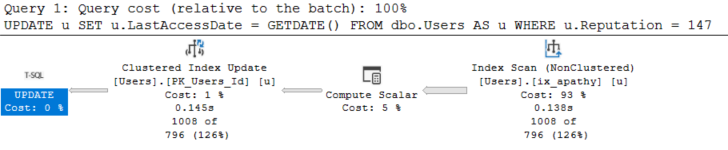
UPDATE u
SET u.LastAccessDate = GETDATE()
FROM dbo.Users AS u
WHERE u.Reputation = 147;
ScannoObjectified
What’s going on here is that the optimizer chooses our narrower index to find data to update.
It’s helpful because we read far less pages than we would if we just scanned the clustered index, but the Reputation column being second means we can’t seek to rows we want.
The optimizer isn’t asking for a missing index here, either (okay, I don’t blame it for a query that runs in 145ms, but stick with me).
Switcheroo
If we change our index to have Reputation first, something nice happens.
To this query.
CREATE INDEX ix_whatever
    ON dbo.Users(Reputation, CreationDate DESC);
SoughtOnly Keys Now
With index order switched, we take more fine-grained locks, and we take them for a shorter period of time.
All That For This
If you have a locking problem, here’s what you should do:
Look at your modification queries that have WHERE clauses, and make sure they have the right indexes
Look at your modification queries that modify lots of rows, and try batching them
If your critical read and write queries are at odds with each other, look into an optimistic isolation level
Thanks for reading!
Going Further
If this is the kind of SQL Server stuff you love learning about, you’ll love my training. Blog readers get 25% off the Everything Bundle — over 100 hours of performance tuning content. Need hands-on help? I offer consulting engagements from targeted investigations to ongoing retainers. Want a quick sanity check before committing to a full engagement? Schedule a call — no commitment required.